API Integration Guide
Purpose
This guide provides developers and IT teams with the information needed to integrate custom systems or proprietary platforms with EFS using our XML API. This is a technical overview and quick-start guide for building custom integrations.
1. Overview of EFS XML API
What is the EFS XML API?
The EFS XML API allows developers to programmatically interact with our fulfillment system to:
- Submit orders for fulfillment
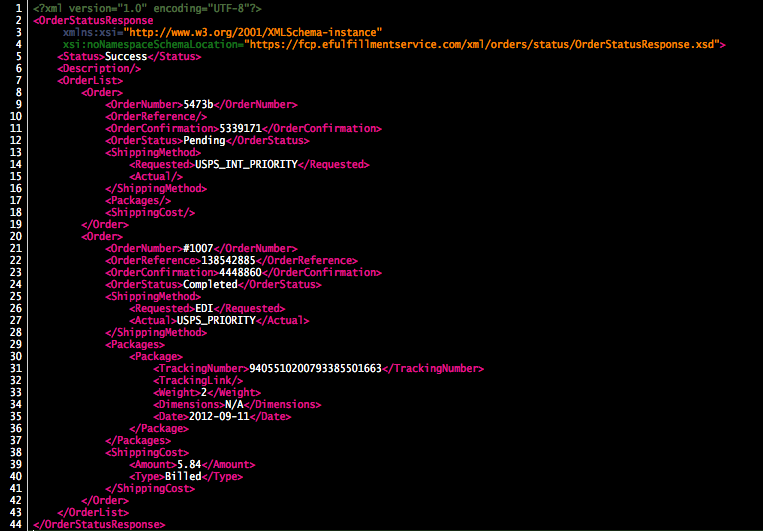
- Retrieve order status and tracking information
- Update inventory levels
- Manage product information
- Query shipping rates
When to Use the API
Use the XML API when:
- ✓ Your platform doesn’t have a pre-built integration
- ✓ You have a custom-built ecommerce system
- ✓ You’re integrating internal business software (ERP, OMS, etc.)
- ✓ You need advanced automation beyond standard integrations
- ✓ You’re building a SaaS product that needs fulfillment integration
- ✓ You require custom business logic or workflows
Don’t use the API when:
- ✗ Your platform has a pre-built integration (use Integration Portal instead)
- ✗ You can use Bulk CSV Upload (simpler for manual imports)
- ✗ You have limited development resources
- ✗ Your order volume is very low (manual entry may be simpler)
API Capabilities
Order Management:
- Submit new orders
- Retrieve order status
- Get tracking information
- Cancel orders (if not yet shipped)
- Update order details (limited)
Inventory Management:
- Query current inventory levels
- Update inventory quantities
- Get inventory activity history
- Set low stock thresholds
Product Management:
- Add new products
- Update product information
- Retrieve product details
- Manage SKU mappings
Shipping:
- Get shipping rate quotes
- Retrieve available shipping methods
- Query carrier information
Reporting:
- Order history reports
- Inventory reports
- Shipping reports
- Billing information
2. Prerequisites
Required Information
Before beginning API integration, gather the following:
☐ FCP Account Setup
- Active eFulfillment Service account
- Products/SKUs entered in FCP
- Inventory received at EFS warehouse
☐ API Credentials
- Merchant Token (authentication key)
- Merchant ID (account identifier)
☐ Technical Requirements
- Development environment capable of HTTP POST requests
- XML parsing/generation capability
- Secure credential storage
- HTTPS/SSL support
☐ Development Resources
- Developer with XML/API experience
- Access to testing environment
- Ability to handle error responses
- Logging/monitoring capability
Getting API Credentials
Step 1: Access Your Credentials
- Log into your Fulfillment Control Panel (FCP)
- Go to Client Info → My Settings
- Scroll to Integration Credentials section
- You’ll see:
- Merchant ID: Your unique account identifier (numeric)
- Merchant Token: Your API authentication key (alphanumeric string)
Step 2: Secure Your Credentials
⚠️ Important Security Notes:
- Merchant Token provides full access to your account
- Never expose token in client-side code or public repositories
- Store securely using environment variables or secrets management
- Rotate token if compromised (contact support)
- Use HTTPS only for all API calls
Step 3: Test Credentials
Before full integration, verify credentials work:
- Use a simple API call (e.g., inventory query)
- Confirm authentication succeeds
- Verify you receive valid XML response
3. API Basics
Endpoint URL
All API requests are sent to:
https://www.efulfillmentservice.com/xml_api_page.php
Method: POST Content-Type: application/x-www-form-urlencoded Protocol: HTTPS only (HTTP not supported)
Authentication
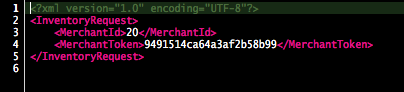
Every API request must include authentication credentials in the XML payload:
xml
YOUR_MERCHANT_ID
YOUR_MERCHANT_TOKEN
```
These tags appear at the beginning of all request XML documents.
### Request Format
**General structure:**
```
POST https://www.efulfillmentservice.com/xml_api_page.php
Content-Type: application/x-www-form-urlencoded
xml_page=[XML_CONTENT_HERE]
Key points:
- Parameter name is xml_page
- XML content must be URL-encoded
- XML must be properly formatted and valid
- Include XML declaration: <?xml version=”1.0″ encoding=”UTF-8″?>
Response Format
All responses are XML documents.
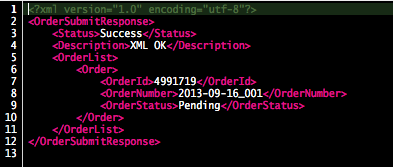
Success response structure:
<?xml version="1.0" encoding="UTF-8"?>
<Status>
<State>Success</State>
<Message>Request processed successfully</Message>
<!-- Additional response data -->
</Status>Error response structure:
<?xml version="1.0" encoding="UTF-8"?>
<Status>
<State>Error</State>
<Message>Error description here</Message>
<ErrorCode>ERROR_CODE</ErrorCode>
</Status>Common Response States
| State | Meaning | Action |
|---|---|---|
| Success | Request completed successfully | Process response data |
| Error | Request failed | Review error message and correct |
| Warning | Request completed with warnings | Review warnings, may need adjustment |
| Pending | Request queued for processing | Poll for status update |
4. Core API Operations
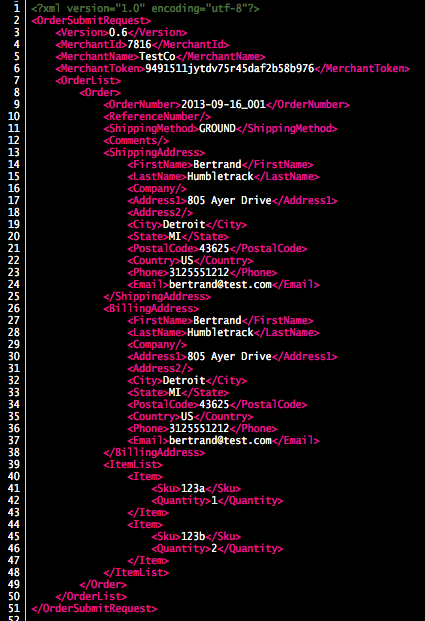
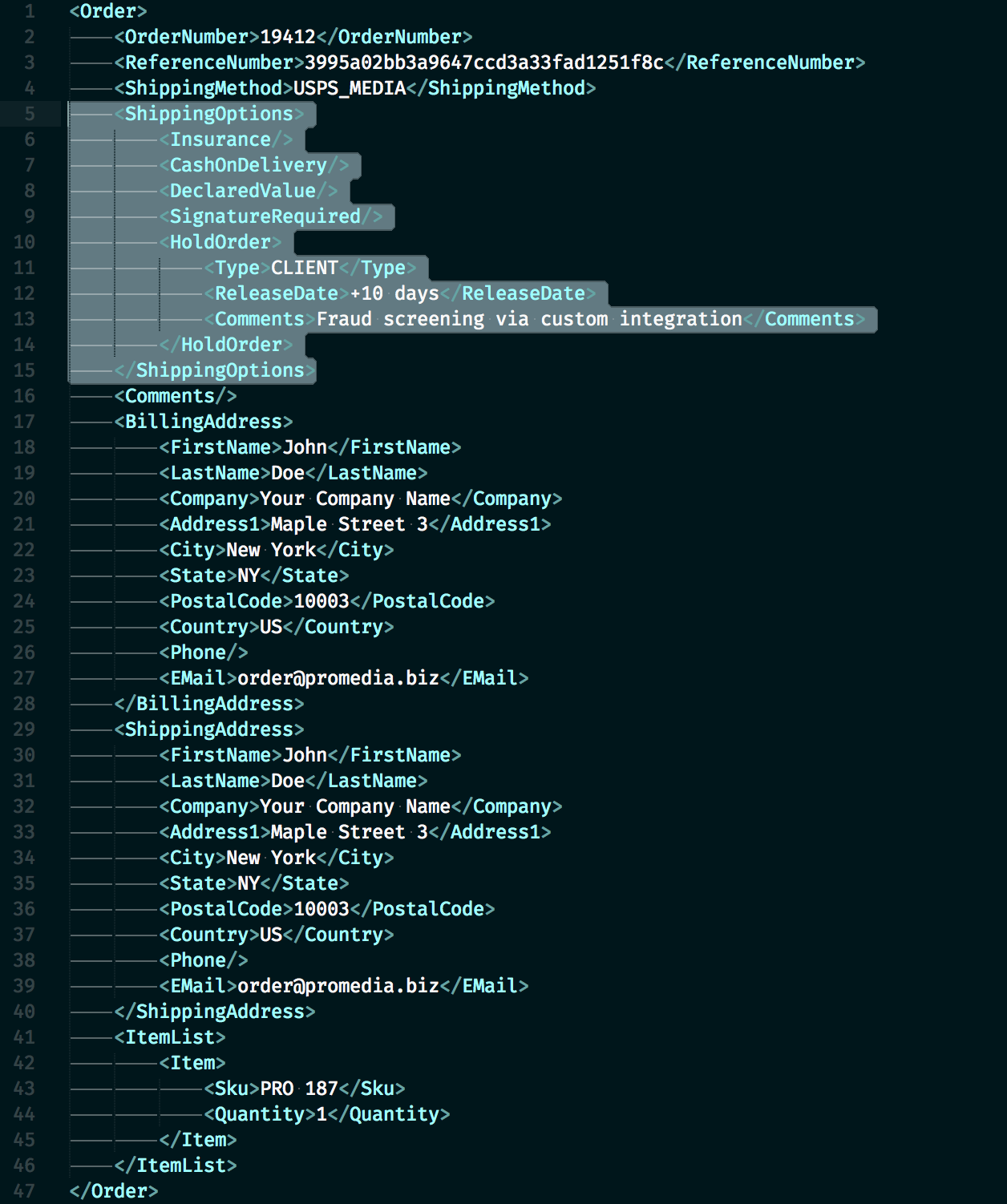
Operation 1: Submit Order
Submit a new order for fulfillment.
Request Type: PostOrders
Basic Example:
<?xml version="1.0" encoding="UTF-8"?>
<PostOrders>
<MerchantId>12345</MerchantId>
<MerchantToken>abc123xyz789</MerchantToken><Order>
<OrderNumber>ORD-2025-001</OrderNumber>
<OrderDate>2025-11-14</OrderDate> <ShipTo>
<Name>John Smith</Name>
<Address1>123 Main Street</Address1>
<Address2>Apt 4B</Address2>
<City>San Francisco</City>
<State>CA</State>
<Zip>94102</Zip>
<Country>US</Country>
<Phone>415-555-1234</Phone>
<Email>[email protected]</Email>
</ShipTo> <ShipMethod>GROUND</ShipMethod> <Items>
<Item>
<SKU>PRODUCT-001</SKU>
<Quantity>2</Quantity>
</Item>
<Item>
<SKU>PRODUCT-002</SKU>
<Quantity>1</Quantity>
</Item>
</Items> <SpecialInstructions>Handle with care</SpecialInstructions>
</Order>
</PostOrders>
Required Fields:
MerchantIdMerchantTokenOrderNumber(must be unique)ShipTo(Name, Address1, City, State, Zip, Country)ShipMethod(valid EFS shipping code)Items(at least one Item with SKU and Quantity)
Optional Fields:
OrderDate(defaults to current date)Address2PhoneEmailSpecialInstructions- Gift message
- Signature required flag
- Insurance value
Response:
<?xml version="1.0" encoding="UTF-8"?>
<Status>
<State>Success</State>
<Message>Order accepted</Message>
<OrderNumber>ORD-2025-001</OrderNumber>
<EFSOrderNumber>EFS123456</EFSOrderNumber>
</Status>Common Errors:
- “Duplicate order number” – OrderNumber already exists
- “Invalid SKU” – SKU not found in FCP
- “Invalid ship method” – ShipMethod code not recognized
- “Invalid address” – Address validation failed
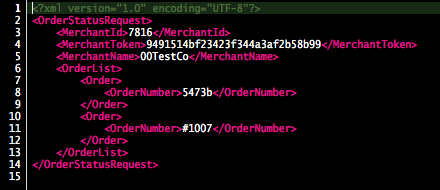
Operation 2: Get Order Status
Query the status of one or more orders.
Request Type: GetOrderStatus
Example:
<?xml version="1.0" encoding="UTF-8"?>
<GetOrderStatus>
<MerchantId>12345</MerchantId>
<MerchantToken>abc123xyz789</MerchantToken>
<OrderNumber>ORD-2025-001</OrderNumber>
</GetOrderStatus>Or query multiple orders:
<?xml version="1.0" encoding="UTF-8"?>
<GetOrderStatus>
<MerchantId>12345</MerchantId>
<MerchantToken>abc123xyz789</MerchantToken>
<StartDate>2025-11-01</StartDate>
<EndDate>2025-11-14</EndDate>
</GetOrderStatus>Response:
<?xml version="1.0" encoding="UTF-8"?>
<Status>
<State>Success</State>
<Orders>
<Order>
<OrderNumber>ORD-2025-001</OrderNumber>
<EFSOrderNumber>EFS123456</EFSOrderNumber>
<Status>Shipped</Status>
<TrackingNumber>1Z999AA10123456784</TrackingNumber>
<Carrier>UPS</Carrier>
<ShipDate>2025-11-13</ShipDate>
<Items>
<Item>
<SKU>PRODUCT-001</SKU>
<QuantityOrdered>2</QuantityOrdered>
<QuantityShipped>2</QuantityShipped>
</Item>
</Items>
</Order>
</Orders>
</Status>Order Status Values:
- Pending – Order received, not yet processed
- Processing – Order being picked/packed
- Shipped – Order shipped (includes tracking)
- Backorder – Waiting for inventory
- Canceled – Order canceled
- On Hold – Order held for review
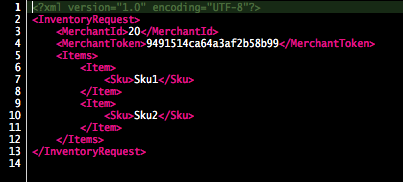
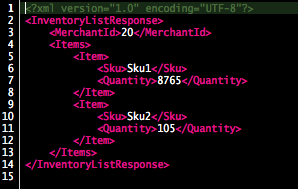
Operation 3: Get Inventory Levels
Query current inventory quantities.
Request Type: GetInventory
Example – All Products:
<?xml version="1.0" encoding="UTF-8"?>
<GetInventory>
<MerchantId>12345</MerchantId>
<MerchantToken>abc123xyz789</MerchantToken>
</GetInventory>Example – Specific SKU:
<?xml version="1.0" encoding="UTF-8"?>
<GetInventory>
<MerchantId>12345</MerchantId>
<MerchantToken>abc123xyz789</MerchantToken>
<SKU>PRODUCT-001</SKU>
</GetInventory>Response:
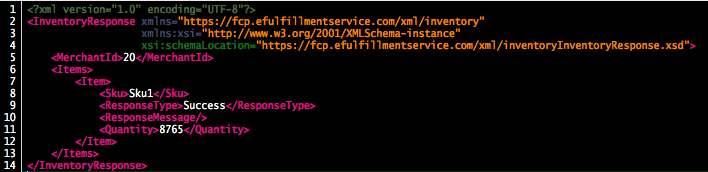
<?xml version="1.0" encoding="UTF-8"?>
<Status>
<State>Success</State>
<Inventory>
<Item>
<SKU>PRODUCT-001</SKU>
<Description>Widget - Blue</Description>
<QuantityAvailable>150</QuantityAvailable>
<QuantityHurt>5</QuantityHurt>
<QuantityAllocated>12</QuantityAllocated>
<QuantityBackorder>0</QuantityBackorder>
<BinLocation>A-12-3</BinLocation>
</Item>
<Item>
<SKU>PRODUCT-002</SKU>
<Description>Widget - Red</Description>
<QuantityAvailable>87</QuantityAvailable>
<QuantityHurt>2</QuantityHurt>
<QuantityAllocated>8</QuantityAllocated>
<QuantityBackorder>0</QuantityBackorder>
<BinLocation>A-12-4</BinLocation>
</Item>
</Inventory>
</Status>Quantity Types:
- QuantityAvailable – Sellable inventory (“Good” inventory)
- QuantityHurt – Damaged/unsellable inventory
- QuantityAllocated – Committed to pending orders
- QuantityBackorder – On backorder status
Operation 4: Update Inventory
Adjust inventory quantities programmatically.
Request Type: UpdateInventory
Example:
<?xml version="1.0" encoding="UTF-8"?>
<UpdateInventory>
<MerchantId>12345</MerchantId>
<MerchantToken>abc123xyz789</MerchantToken>
<Items>
<Item>
<SKU>PRODUCT-001</SKU>
<Quantity>150</Quantity>
<AdjustmentType>Set</AdjustmentType>
<Reason>Inventory correction</Reason>
</Item>
</Items>
</UpdateInventory>Adjustment Types:
- Set – Set inventory to specific quantity
- Add – Add to current quantity (e.g., Add 50)
- Subtract – Subtract from current quantity (e.g., Subtract 10)
Response:
<?xml version="1.0" encoding="UTF-8"?>
<Status>
<State>Success</State>
<Message>Inventory updated</Message>
<Items>
<Item>
<SKU>PRODUCT-001</SKU>
<OldQuantity>100</OldQuantity>
<NewQuantity>150</NewQuantity>
</Item>
</Items>
</Status>⚠️ Important Notes:
- Inventory updates should be used sparingly
- May conflict with receiving activity
- Large adjustments should be coordinated with EFS
- Consider using receiving process instead for incoming inventory
Operation 5: Get Shipping Rates
Request shipping rate quotes for potential orders.
Request Type: GetShippingRates
Example:
<?xml version="1.0" encoding="UTF-8"?>
<GetShippingRates>
<MerchantId>12345</MerchantId>
<MerchantToken>abc123xyz789</MerchantToken>
<DestinationAddress>
<City>San Francisco</City>
<State>CA</State>
<Zip>94102</Zip>
<Country>US</Country>
</DestinationAddress>
<Items>
<Item>
<SKU>PRODUCT-001</SKU>
<Quantity>2</Quantity>
</Item>
</Items>
</GetShippingRates>Response:
<?xml version="1.0" encoding="UTF-8"?>
<Status>
<State>Success</State>
<ShippingRates>
<Rate>
<Method>GROUND</Method>
<ServiceName>FedEx Ground</ServiceName>
<Cost>8.50</Cost>
<TransitDays>3-5</TransitDays>
</Rate>
<Rate>
<Method>PRIORITY</Method>
<ServiceName>USPS Priority Mail</ServiceName>
<Cost>12.75</Cost>
<TransitDays>2-3</TransitDays>
</Rate>
<Rate>
<Method>2DAY</Method>
<ServiceName>FedEx 2Day</ServiceName>
<Cost>24.50</Cost>
<TransitDays>2</TransitDays>
</Rate>
</ShippingRates>
</Status>Use Cases:
- Display real-time shipping rates at checkout
- Calculate total order cost
- Allow customers to choose shipping method
- Compare shipping costs across methods
Operation 6: Cancel Order
Cancel an order that hasn’t shipped yet.
Request Type: CancelOrder
Example:
<?xml version="1.0" encoding="UTF-8"?>
<CancelOrder>
<MerchantId>12345</MerchantId>
<MerchantToken>abc123xyz789</MerchantToken>
<OrderNumber>ORD-2025-001</OrderNumber>
<Reason>Customer requested cancellation</Reason>
</CancelOrder>Response – Success:
<?xml version="1.0" encoding="UTF-8"?>
<Status>
<State>Success</State>
<Message>Order canceled successfully</Message>
<OrderNumber>ORD-2025-001</OrderNumber>
</Status>Response – Already Shipped:
<?xml version="1.0" encoding="UTF-8"?>
<Status>
<State>Error</State>
<Message>Order has already shipped and cannot be canceled</Message>
<OrderNumber>ORD-2025-001</OrderNumber>
<TrackingNumber>1Z999AA10123456784</TrackingNumber>
</Status>⚠️ Important:
- Orders can only be canceled if status is “Pending”
- Once “Processing” or “Shipped”, cancellation not possible via API
- Contact support for emergency cancellation of processing orders
- Cancellation fees may apply per service agreement
5. Shipping Method Codes
Use these codes in the <ShipMethod> tag when submitting orders.
Domestic Shipping Codes
| Code | Service | Typical Transit |
| GROUND | Standard Ground | 3-7 business days |
| Best Rate Economy Lightweight Post | Rate shopping – cheapest | 3-7 business days |
| FIRST_CLASS | USPS First Class | 2-5 business days |
| PRIORITY | USPS Priority Mail | 2-3 business days |
| PRIORITY_EXPRESS | USPS Priority Express | 1-2 business days |
| 2DAY | 2-Day Air | 2 business days |
| OVERNIGHT | Next Day Air | 1 business day |
| SATURDAY | Saturday Delivery | Next Saturday |
International Shipping Codes
| Code | Service | Typical Transit |
| INTERNATIONAL_DEFAULT | Standard International | 7-21 business days |
| INTERNATIONAL_PRIORITY | Priority International | 6-10 business days |
| INTERNATIONAL_EXPRESS | Express International | 3-5 business days |
Special Codes
| Code | Purpose |
| HOLD | Hold for pickup (won’t ship) |
| SHIP_ALONE | Ship separately from other orders |
Note: Invalid ship method codes will cause order rejection. Contact support if you need a shipping method not listed.
6. Error Handling
HTTP Response Codes
The API endpoint returns HTTP status codes:
|
HTTP Code |
Meaning |
Action |
|
200 OK |
Request received |
Parse XML response for success/error |
|
400 Bad Request |
Malformed XML |
Check XML syntax |
|
401 Unauthorized |
Invalid credentials |
Verify MerchantId and MerchantToken |
|
500 Server Error |
Server issue |
Retry after delay, contact support if persists |
|
503 Service Unavailable |
Maintenance |
Retry after delay |
Common XML Error Codes
|
Error Code |
Message |
Solution |
|
AUTH_FAILED |
Authentication failed |
Check credentials are correct |
|
INVALID_SKU |
SKU not found |
Add product to FCP or correct SKU |
|
DUPLICATE_ORDER |
Order number already exists |
Use unique order numbers |
|
INVALID_ADDRESS |
Address validation failed |
Verify address completeness and accuracy |
|
INVALID_SHIP_METHOD |
Ship method not recognized |
Use valid shipping code |
|
INSUFFICIENT_INVENTORY |
Not enough inventory |
Check inventory levels |
|
MALFORMED_XML |
XML parsing error |
Validate XML syntax |
|
MISSING_REQUIRED_FIELD |
Required field missing |
Review required fields for request type |
Error Response Example
<?xml version="1.0" encoding="UTF-8"?>
<Status>
<State>Error</State>
<Message>Invalid SKU: PRODUCT-999 not found in your inventory</Message>
<ErrorCode>INVALID_SKU</ErrorCode>
<Field>Items.Item.SKU</Field>
<Value>PRODUCT-999</Value>
</Status>Best Practices for Error Handling
1. Parse All Responses
# Pseudocode example
response = send_api_request(xml_data)
xml_doc = parse_xml(response.body)
if xml_doc.status.state == "Error":
log_error(xml_doc.status.message)
handle_error(xml_doc.status.error_code)
else:
process_success(xml_doc)2. Implement Retry Logic
- Retry on HTTP 500/503 errors
- Use exponential backoff (1s, 2s, 4s, 8s)
- Max 3-5 retry attempts
- Don’t retry on 400/401 errors (fix request instead)
3. Log All Requests and Responses
- Log request XML (sanitize credentials)
- Log response XML
- Log timestamps and HTTP codes
- Aids in debugging and support requests
4. Validate Before Sending
- Validate XML syntax before sending
- Check required fields present
- Verify data types correct
- Test against schema if available
5. Handle Timeouts
- Set reasonable timeout (30-60 seconds)
- Don’t retry immediately on timeout
- Log timeout occurrences
- Contact support if frequent timeouts
7. Testing Your Integration
Test Environment
⚠️ Important: EFS does not have a separate test/sandbox environment.
All API calls interact with your live FCP account.
Testing strategy:
- Use test products with low inventory value
- Use unique order numbers (prefix with “TEST-“)
- Monitor orders closely in FCP
- Cancel test orders after verification
- Budget for test order shipping costs
Testing Checklist
☐ Phase 1: Authentication
- Verify credentials work
- Test with simple inventory query
- Confirm XML parsing works
- Check error handling for bad credentials
☐ Phase 2: Read Operations
- Get inventory for all products
- Get inventory for specific SKU
- Query order status (if previous orders exist)
- Verify response parsing
☐ Phase 3: Order Submission
- Submit test order with valid data
- Verify order appears in FCP
- Check order details are correct
- Test required vs optional fields
☐ Phase 4: Error Scenarios
- Submit order with invalid SKU
- Submit order with invalid address
- Submit duplicate order number
- Submit order with invalid ship method
- Verify errors handled gracefully
☐ Phase 5: Order Tracking
- Allow test order to ship
- Query order status
- Verify tracking number received
- Test tracking number format parsing
☐ Phase 6: Edge Cases
- Multi-item orders
- Large quantity orders
- International addresses
- Special characters in names/addresses
- PO Box addresses
- APO/FPO addresses
☐ Phase 7: Performance
- Test with multiple concurrent requests
- Measure response times
- Test under load
- Verify timeout handling
Sample Test Orders
Test Order 1: Simple Domestic
- 1 SKU, quantity 1
- Residential address
- Ground shipping
- Minimal optional fields
Test Order 2: Multi-Item
- 3 different SKUs
- Various quantities
- Standard shipping
- Special instructions included
Test Order 3: International
- 1-2 SKUs
- International address (Canada or UK)
- International ship method
- Phone and email included
Test Order 4: Express Shipping
- 1 SKU
- 2DAY or OVERNIGHT method
- Signature required flag
- Insurance value included
Monitoring Live Orders
After going live:
Week 1: Monitor Daily
- Check all orders in FCP
- Verify order details accurate
- Confirm tracking updates working
- Watch for any errors
Week 2-4: Monitor Regularly
- Spot-check orders
- Review error logs
- Verify inventory accuracy
- Address any issues promptly
Ongoing: Automated Monitoring
- Set up error alerts
- Monitor API response times
- Track success/failure rates
- Log unusual patterns
8. Best Practices
Security
✓ DO:
- Store credentials securely (environment variables, secrets manager)
- Use HTTPS only
- Sanitize credentials from logs
- Rotate tokens if compromised
- Limit credential access to necessary personnel
- Encrypt credentials at rest
✗ DON’T:
- Hard-code credentials in source code
- Commit credentials to version control
- Expose credentials in client-side code
- Share credentials via email or chat
- Log full requests including credentials
- Use HTTP (unencrypted)
Performance
Optimize API Usage:
- Batch requests when possible (e.g., query multiple orders at once)
- Cache inventory data (don’t query every page load)
- Use webhooks if available (future feature)
- Implement rate limiting in your application
- Schedule intensive operations during off-peak hours
Rate Limiting:
- While no hard limits published, be reasonable
- Don’t exceed 10 requests per second
- Space out bulk operations
- Contact support for high-volume needs
Data Validation
Before Sending Orders:
- ✓ Validate address format and completeness
- ✓ Verify SKUs exist in your FCP account
- ✓ Check ship method is valid
- ✓ Ensure quantities are positive integers
- ✓ Verify order number is unique
- ✓ Confirm all required fields present
Before Inventory Updates:
- ✓ Verify SKU exists
- ✓ Check quantity is reasonable
- ✓ Include reason for adjustment
- ✓ Log all inventory changes
Error Recovery
Implement Robust Error Handling:
- Log all errors with context
- Retry transient errors (timeouts, 500s)
- Alert on repeated failures
- Provide fallback mechanisms
- Don’t fail silently
Order Submission Failures:
- Queue failed orders for retry
- Alert operations team
- Consider manual order entry as fallback
- Don’t lose customer orders
Logging and Monitoring
Log:
- All API requests (sanitized)
- All API responses
- Error conditions
- Performance metrics (response times)
- Retry attempts
Monitor:
- Success/failure rates
- Response time trends
- Error frequency
- Queue depths (if applicable)
- Inventory sync accuracy
XML Formatting
Follow XML Best Practices:
- Use proper XML declaration
- Encode special characters (< > & " ')
- Use UTF-8 encoding
- Validate XML before sending
- Use CDATA for long text fields if needed
Example of Special Character Encoding:
<Name>John & Jane Smith</Name> <!-- Correct -->
<Name>John & Jane Smith</Name> <!-- Incorrect -->Documentation
Document Your Integration:
- Map your system fields to API fields
- Document SKU mapping logic
- List ship method mappings
- Record credential locations
- Note any custom business logic
- Maintain API version used
9. Code Examples
Example 1: Submit Order (Python)
import requests
import xml.etree.ElementTree as ET
from urllib.parse import urlencode
# Configuration
API_URL = "https://www.efulfillmentservice.com/xml_api_page.php"
MERCHANT_ID = "12345"
MERCHANT_TOKEN = "abc123xyz789"
def submit_order(order_data):
"""
Submit an order to EFS via XML API
Args:
order_data: Dict containing order information
Returns:
Dict with success status and EFS order number or error
"""
# Build XML
root = ET.Element("PostOrders")
# Authentication
ET.SubElement(root, "MerchantId").text = MERCHANT_ID
ET.SubElement(root, "MerchantToken").text = MERCHANT_TOKEN
# Order
order = ET.SubElement(root, "Order")
ET.SubElement(order, "OrderNumber").text = order_data['order_number']
ET.SubElement(order, "OrderDate").text = order_data['order_date']
# Shipping Address
ship_to = ET.SubElement(order, "ShipTo")
ET.SubElement(ship_to, "Name").text = order_data['ship_name']
ET.SubElement(ship_to, "Address1").text = order_data['ship_address1']
if order_data.get('ship_address2'):
ET.SubElement(ship_to, "Address2").text = order_data['ship_address2']
ET.SubElement(ship_to, "City").text = order_data['ship_city']
ET.SubElement(ship_to, "State").text = order_data['ship_state']
ET.SubElement(ship_to, "Zip").text = order_data['ship_zip']
ET.SubElement(ship_to, "Country").text = order_data['ship_country']
ET.SubElement(ship_to, "Phone").text = order_data['ship_phone']
ET.SubElement(ship_to, "Email").text = order_data['ship_email']
# Ship Method
ET.SubElement(order, "ShipMethod").text = order_data['ship_method']
# Items
items = ET.SubElement(order, "Items")
for item in order_data['items']:
item_elem = ET.SubElement(items, "Item")
ET.SubElement(item_elem, "SKU").text = item['sku']
ET.SubElement(item_elem, "Quantity").text = str(item['quantity'])
# Convert to string
xml_string = ET.tostring(root, encoding='unicode')
xml_with_declaration = f'<?xml version="1.0" encoding="UTF-8"?>{xml_string}'
# URL encode
payload = urlencode({'xml_page': xml_with_declaration})
# Send request
try:
response = requests.post(
API_URL,
data=payload,
headers={'Content-Type': 'application/x-www-form-urlencoded'},
timeout=30
)
# Parse response
response_root = ET.fromstring(response.text)
state = response_root.find('State').text
message = response_root.find('Message').text
if state == "Success":
efs_order_num = response_root.find('EFSOrderNumber').text
return {
'success': True,
'efs_order_number': efs_order_num,
'message': message
}
else:
error_code = response_root.find('ErrorCode')
return {
'success': False,
'error': message,
'error_code': error_code.text if error_code is not None else None
}
except requests.exceptions.Timeout:
return {'success': False, 'error': 'Request timeout'}
except requests.exceptions.RequestException as e:
return {'success': False, 'error': str(e)}
except ET.ParseError as e:
return {'success': False, 'error': f'XML parse error: {str(e)}'}
# Usage example
order = {
'order_number': 'ORD-2025-001',
'order_date': '2025-11-14',
'ship_name': 'John Smith',
'ship_address1': '123 Main St',
'ship_address2': 'Apt 4B',
'ship_city': 'San Francisco',
'ship_state': 'CA',
'ship_zip': '94102',
'ship_country': 'US',
'ship_phone': '415-555-1234',
'ship_email': '[email protected]',
'ship_method': 'GROUND',
'items': [
{'sku': 'PRODUCT-001', 'quantity': 2},
{'sku': 'PRODUCT-002', 'quantity': 1}
]
}
result = submit_order(order)
if result['success']:
print(f"Order submitted successfully: {result['efs_order_number']}")
else:
print(f"Order submission failed: {result['error']}")Example 2: Get Inventory (PHP)
<?php
class EFSApi {
private $apiUrl = 'https://www.efulfillmentservice.com/xml_api_page.php';
private $merchantId;
private $merchantToken;
public function __construct($merchantId, $merchantToken) {
$this->merchantId = $merchantId;
$this->merchantToken = $merchantToken;
}
public function getInventory($sku = null) {
// Build XML
$xml = new SimpleXMLElement('<?xml version="1.0" encoding="UTF-8"?><GetInventory></GetInventory>');
$xml->addChild('MerchantId', $this->merchantId);
$xml->addChild('MerchantToken', $this->merchantToken);
if ($sku !== null) {
$xml->addChild('SKU', $sku);
}
// Send request
$response = $this->sendRequest($xml->asXML());
// Parse response
$responseXml = simplexml_load_string($response);
if ((string)$responseXml->State === 'Success') {
$inventory = [];
foreach ($responseXml->Inventory->Item as $item) {
$inventory[] = [
'sku' => (string)$item->SKU,
'description' => (string)$item->Description,
'quantity_available' => (int)$item->QuantityAvailable,
'quantity_hurt' => (int)$item->QuantityHurt,
'quantity_allocated' => (int)$item->QuantityAllocated,
'bin_location' => (string)$item->BinLocation
];
}
return ['success' => true, 'inventory' => $inventory];
} else {
return [
'success' => false,
'error' => (string)$responseXml->Message,
'error_code' => (string)$responseXml->ErrorCode
];
}
}
private function sendRequest($xmlData) {
$postData = http_build_query(['xml_page' => $xmlData]);
$ch = curl_init();
curl_setopt($ch, CURLOPT_URL, $this->apiUrl);
curl_setopt($ch, CURLOPT_POST, true);
curl_setopt($ch, CURLOPT_POSTFIELDS, $postData);
curl_setopt($ch, CURLOPT_RETURNTRANSFER, true);
curl_setopt($ch, CURLOPT_HTTPHEADER, [
'Content-Type: application/x-www-form-urlencoded'
]);
curl_setopt($ch, CURLOPT_TIMEOUT, 30);
$response = curl_exec($ch);
if (curl_errno($ch)) {
throw new Exception('cURL error: ' . curl_error($ch));
}
curl_close($ch);
return $response;
}
}
// Usage
$api = new EFSApi('12345', 'abc123xyz789');
// Get all inventory
$result = $api->getInventory();
if ($result['success']) {
foreach ($result['inventory'] as $item) {
echo "{$item['sku']}: {$item['quantity_available']} available\n";
}
} else {
echo "Error: {$result['error']}\n";
}
// Get specific SKU
$result = $api->getInventory('PRODUCT-001');
?>Example 3: Get Order Status (Node.js)
const axios = require('axios');
const xml2js = require('xml2js');
const API_URL = 'https://www.efulfillmentservice.com/xml_api_page.php';
const MERCHANT_ID = '12345';
const MERCHANT_TOKEN = 'abc123xyz789';
async function getOrderStatus(orderNumber) {
// Build XML
const builder = new xml2js.Builder({
xmldec: { version: '1.0', encoding: 'UTF-8' }
});
const xmlObj = {
GetOrderStatus: {
MerchantId: MERCHANT_ID,
MerchantToken: MERCHANT_TOKEN,
OrderNumber: orderNumber
}
};
const xmlData = builder.buildObject(xmlObj);
try {
// Send request
const response = await axios.post(API_URL,
`xml_page=${encodeURIComponent(xmlData)}`,
{
headers: {
'Content-Type': 'application/x-www-form-urlencoded'
},
timeout: 30000
}
);
// Parse response
const parser = new xml2js.Parser();
const result = await parser.parseStringPromise(response.data);
if (result.Status.State[0] === 'Success') {
const order = result.Status.Orders[0].Order[0];
return {
success: true,
order: {
orderNumber: order.OrderNumber[0],
efsOrderNumber: order.EFSOrderNumber[0],
status: order.Status[0],
trackingNumber: order.TrackingNumber ? order.TrackingNumber[0] : null,
carrier: order.Carrier ? order.Carrier[0] : null,
shipDate: order.ShipDate ? order.ShipDate[0] : null
}
};
} else {
return {
success: false,
error: result.Status.Message[0],
errorCode: result.Status.ErrorCode ? result.Status.ErrorCode[0] : null
};
}
} catch (error) {
return {
success: false,
error: error.message
};
}
}
// Usage
(async () => {
const result = await getOrderStatus('ORD-2025-001');
if (result.success) {
console.log('Order Status:', result.order.status);
if (result.order.trackingNumber) {
console.log('Tracking:', result.order.trackingNumber);
}
} else {
console.error('Error:', result.error);
}
})();10. Additional Resources
Full API Documentation
For complete technical specifications, detailed field descriptions, and advanced features:
Contact your Client Care Account Specialist to request access to full API documentation.
Documentation includes:
- Complete XML schema definitions
- All available API operations
- Advanced features (bundling, kitting, special services)
- Webhook configurations (if available)
- Advanced error codes
- Performance optimization guidelines
Support Resources
Technical Support:
- Submit support ticket: FCP → Client Info → Support
- Email: [email protected]
- Phone: 1-866-922-6783 (Press 2)
For API-Specific Questions:
- Title support ticket: “API Integration Question”
- Include code samples and error messages
- Provide request/response XML (sanitize credentials)
Client Care Account Specialist:
- API documentation requests
- High-volume integration planning
- Custom feature requests
- Performance optimization consultation
Related Guides
- Bulk Upload CSV Guide – Alternative for manual order imports
- Platform Integration Guides – Pre-built integrations for common platforms
- FCP Quick Reference – Understanding FCP functionality
- Receiving Guide – Product setup requirements
Development Tools
Recommended Libraries:
Python:
- requests (HTTP client)
- xml.etree.ElementTree (XML parsing)
- lxml (advanced XML processing)
PHP:
- cURL (HTTP client)
- SimpleXML (XML parsing)
- DOMDocument (advanced XML)
Node.js:
- axios (HTTP client)
- xml2js (XML parsing)
- fast-xml-parser (fast parsing)
Ruby:
- HTTParty (HTTP client)
- Nokogiri (XML parsing)
Java:
- Apache HttpClient (HTTP)
- JAXB (XML binding)
- DOM/SAX parsers
XML Validators
Test your XML before sending:
- XMLLint (command-line)
- Online validators (search “XML validator”)
- IDE plugins (VSCode XML extension, IntelliJ XML support)
11. Frequently Asked Questions
Q: Is there a sandbox/test environment? A: No, all API calls interact with your live account. Use test products and monitor orders carefully during development.
Q: What’s the API rate limit? A: While no hard limit is published, keep requests under 10 per second. Contact support for high-volume needs.
Q: Can I get webhooks for order updates? A: Webhook functionality may be available. Contact your Client Care Account Specialist to discuss.
Q: How quickly are orders processed after submission? A: Orders typically ship within 1 business day of receipt. API submission is immediate.
Q: Can I update orders after submission? A: Limited updates possible via API (cancel if pending). For other changes, contact support immediately.
Q: What if my platform isn’t in your pre-built integrations? A: Use the XML API to build a custom integration or use Bulk CSV Upload as an alternative.
Q: Can I submit orders with multiple ship-to addresses? A: No, each order must have single ship-to address. Submit separate orders for multiple destinations.
Q: How do I handle split shipments? A: If an order ships in multiple packages, you’ll receive multiple tracking numbers. Query order status to get all tracking.
Q: Can I white-label the API (use for my own clients)? A: Contact your Client Care Account Specialist to discuss reseller or white-label arrangements.
Q: What if I need help with my integration? A: Submit a support ticket with details about your integration, including code samples and error messages.
12. Next Steps
To begin your API integration:
- Gather credentials from FCP (Merchant ID and Token)
- Review code examples in your preferred language
- Set up development environment with secure credential storage
- Test authentication with simple inventory query
- Submit test orders and verify in FCP
- Implement error handling and logging
- Test edge cases and error scenarios
- Monitor live orders closely for first week
- Request full API documentation if needed for advanced features
For assistance at any stage, contact your Client Care Account Specialist or submit a support ticket.