
Your product feed is about to become more valuable than your entire website.
If that sounds dramatic, consider this: when a customer uses Google’s AI Mode to shop, they never see your homepage. They don’t see your lifestyle photography, your brand story, or your carefully crafted product descriptions. The AI reads your structured data feed, and if your attributes are incomplete or vague, it recommends your competitor instead.
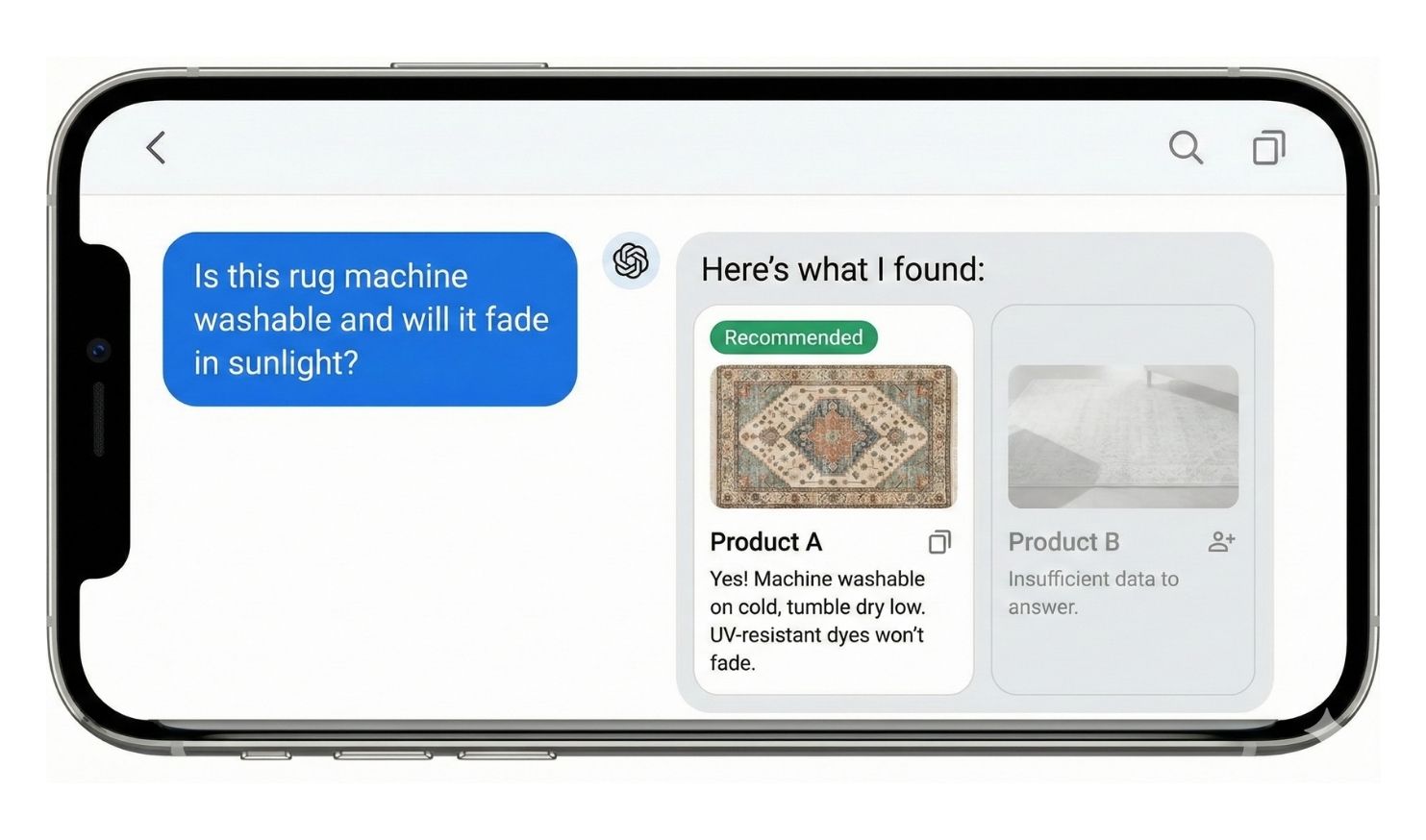
This is the new reality of agentic commerce. The AI agent needs to answer customer questions with confidence. “Will this fade in sunlight?” “Is it machine washable?” “Does it work with my existing setup?” If your data can’t answer these questions, you’re invisible.
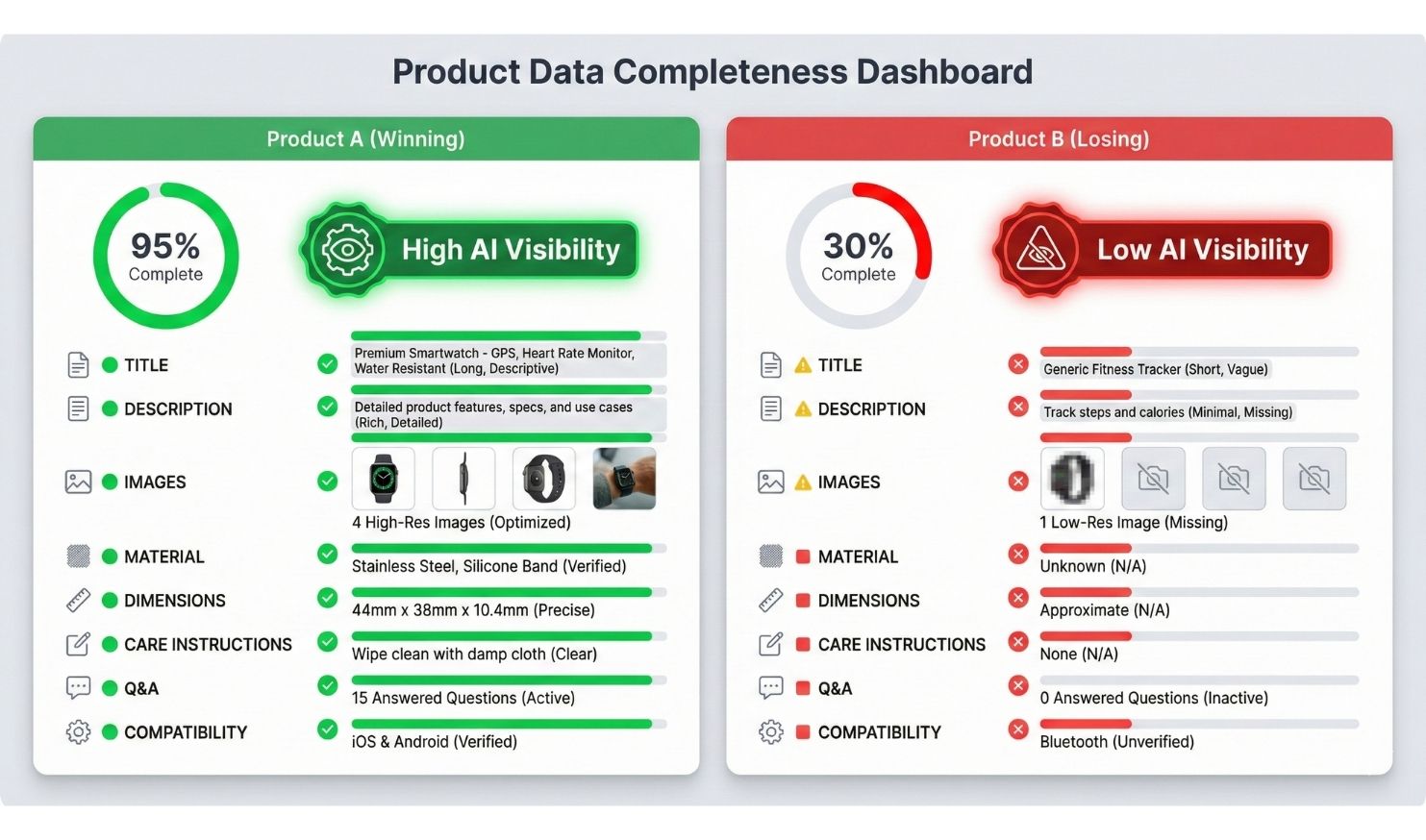
The research is already backing this up. Stores with 99.9% attribute completion (what the industry calls a “Golden Record”) are seeing 3-4x higher visibility in AI recommendations compared to stores with sparse data. That’s not a small edge. That’s the difference between thriving and disappearing.
This guide walks you through exactly how to optimize your product data for AI discovery. We’ll cover which attributes matter most, how to structure your data for conversational queries, and the specific fields Google’s AI prioritizes when making recommendations.
Jump right in: Google’s Universal Commerce Protocol (UCP)
- Why AI Agents Need Different Data Than Humans
- The Product Data Hierarchy: What to Optimize First
- Critical Attributes for AI Recommendations in 2026
- Conversational Commerce Fields: The New Competitive Edge
- Category-Specific Optimization Guides
- Real-Time Data Requirements: Inventory and Shipping
- Quality Scoring: How Google Evaluates Your Feed
- Implementation: Tools and Workflow
- Testing and Monitoring Your Optimizations
- Tools and Resources
Why AI Agents Need Different Data Than Humans
A human browsing your website can fill in gaps. They see a blue shirt, they assume it comes in other colors even if you don’t list them. They read “durable construction” and infer it might be good for outdoor use. They tolerate vagueness because they can ask questions or make educated guesses.
AI agents can’t do any of that.

How AI Agents Parse Product Information
When Google’s AI encounters your product, it’s reading structured fields in a specific order:
- Title and description (parsed for keywords and attributes)
- Explicit attributes (size, color, material, weight, dimensions)
- Categorical data (product type, Google Product Category)
- Supplementary fields (Q&A, compatibility, certifications)
- Contextual data (reviews, usage scenarios, care instructions)
If a field is empty, the AI doesn’t guess. It marks it as “unknown” and moves on. If a customer asks “Is this waterproof?” and your data doesn’t explicitly say, the AI responds “I don’t have that information” or recommends a competitor whose data does answer the question.
The Confidence Threshold Problem
AI agents operate on confidence scores. When a customer asks for “machine washable rugs under $200 in modern style,” the agent scores every product in its index based on how well it matches those criteria.
High confidence match:
- Explicit attribute: care_instructions: “machine washable”
- Price: $179.99
- Style attribute: style: “modern”
- Result: 95% confidence, recommended first
Low confidence match:
- Description mentions “easy to clean” (not explicitly machine washable)
- Price: $189.99
- No style attribute listed
- Result: 62% confidence, ranked 8th or excluded entirely
The difference between first recommendation and eighth is often just data completeness, not product quality.

How UCP Changes Where Customers Find and Buy From You
Visibility is no longer about SEO rankings or ad spend alone. It’s about data readiness.
An AI agent can’t “see” your beautiful product photography or clever copywriting. It reads structured data. If your product feed has incomplete attributes, vague shipping information, or missing compatibility details, the AI will skip you and recommend a competitor with better data.
The website is becoming a secondary asset. Your primary interface with customers is now your product feed and your ability to speak the UCP protocol. This is a huge advantage for small sellers who never had the budget to compete on web design or paid ads, but it’s a threat to anyone who’s been coasting on brand recognition without maintaining their backend data.
The Product Data Hierarchy: What to Optimize First
You probably have hundreds or thousands of SKUs. You can’t optimize everything overnight. Here’s how to prioritize.
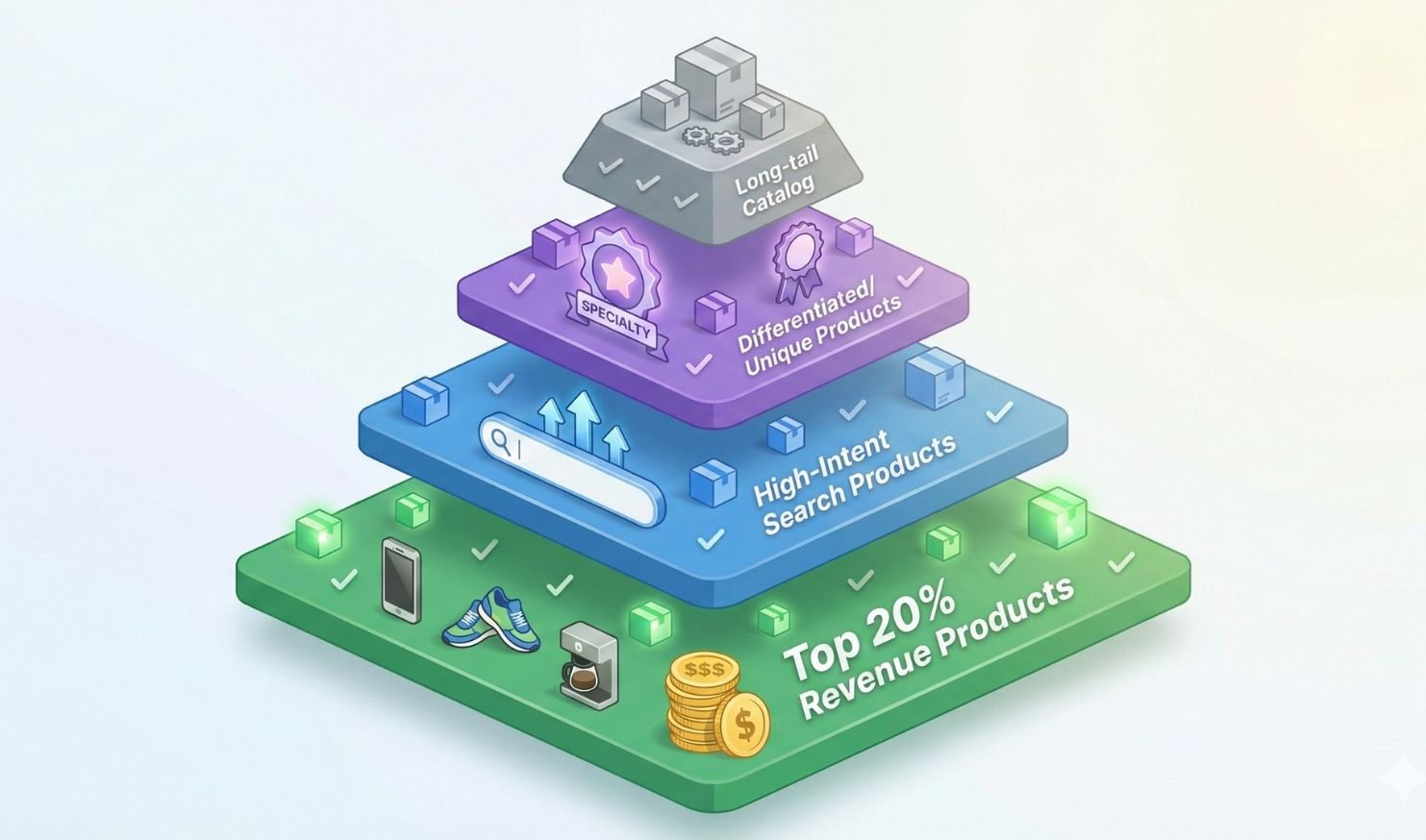
Tier 1: Revenue-Driving Products (Top 20%)
Start with your Pareto products. The 20% of SKUs that drive 80% of revenue.
Why these matter most:
- They’re already converting, so AI visibility multiplies existing success
- They likely have the best margins to justify the time investment
- Customer questions about these products are already documented (pull from support tickets)
Action steps:
- Export your last 12 months of sales data
- Identify top 20% by revenue
- Audit current attribute completion percentage
- Set target: 95%+ completion within 30 days
Tier 2: High-Intent Search Products
These are products people actively search for by specific attributes. “Waterproof hiking boots size 10” or “32-inch curved monitor 144hz.”
How to identify them:
- Check Google Search Console for high-impression, low-click queries
- Look at Google Merchant Center diagnostic reports for products with high views but low engagement
- Review internal site search logs for attribute-specific queries
Why these matter: AI queries are naturally more specific than traditional searches. Someone using AI Mode is having a conversation, which means they’re drilling down on specifics. “Show me waterproof options” → “Which ones have the best ankle support?” → “Are any of those under $150?”
If your data can’t answer each progressive question, you lose the sale at step two or three.
Tier 3: Differentiated or Unique Products
Products where you have a competitive advantage (exclusivity, customization, unique features).
Why these matter: Generic products compete on price. Unique products compete on attributes. If you’re the only seller with a specific feature, make sure the AI knows it.
Example: You sell handmade rugs with natural dye processes. If your data just says “rug, wool, blue,” you’re competing with 10,000 other blue wool rugs. If your data says:
- material: hand-spun wool
- dye_type: plant-based natural dyes
- production_method: hand-knotted
- origin: fair-trade certified artisan cooperative
- care_note: natural dye variation is normal and desirable
Now you’re the answer to “show me eco-friendly rugs made with traditional methods.”
Tier 4: Everything Else
Once you’ve handled high-value products, work through the rest of your catalog systematically. Even low-volume items benefit from complete data because they might be the perfect answer to a very specific AI query.
Save Yourself the Headache and Let us Handle Your Fulfillment!
See How Using a 3PL for saves eCommerce sellers time. Get a Free Quote from eFulfillment Service Today!
Critical Attributes for AI Recommendations in 2026
Google Merchant Center has hundreds of possible attributes. Most sellers fill out 10-15. Here are the ones that directly impact AI visibility.
Universal Attributes (Every Product Category)
These apply regardless of what you sell.
| Attribute | Why It Matters | Example |
| title | Primary matching signal | “Women’s Merino Wool Hiking Socks – Moisture Wicking – Size M” (not just “Hiking Socks”) |
| description | Secondary matching + conversational context | Structured paragraphs covering features, benefits, use cases, care |
| brand | Trust signal + brand preference queries | Official manufacturer name, not “Generic” or “Unbranded” |
| gtin (UPC/EAN) | Verification + cross-platform matching | Required for branded products |
| condition | Filters out mismatches | “new” vs “refurbished” vs “used” |
| availability | Real-time stock status | “in stock” vs “out of stock” vs “preorder” vs “backorder” |
| price | Primary filter criterion | Must match your site exactly, including sale prices |
| image_link | Visual verification (AI can read images) | High-res, white background for main image |
| additional_image_link | Lifestyle context | In-use photos, scale references, detail shots |
| product_type | Your taxonomy (more specific than Google’s) | “Home > Rugs > Area Rugs > Modern” |
| google_product_category | Google’s taxonomy | Use the most specific category ID possible |
Material and Construction Attributes
AI agents get tons of questions about what things are made of and how they’re built.
Critical fields:
- material: Primary material (cotton, steel, plastic, etc.)
- material_composition: Percentage breakdown (“80% cotton, 20% polyester”)
- construction_method: How it’s made (“injection molded,” “hand-stitched,” “CNC machined”)
- finish: Surface treatment (“powder-coated,” “natural oil finish,” “matte”)
- weight: Actual weight with unit
- dimensions: Length x width x height with units
Why these matter: “Show me lightweight options” requires weight data. “What’s this made of?” requires material. “Will this match my stainless steel appliances?” requires finish.
Performance and Specification Attributes
For any product with measurable performance characteristics.
Examples by category:
- Electronics: wattage, voltage, battery_life, connectivity (Bluetooth 5.0, WiFi 6)
- Apparel: fabric_weight (gsm), fit_type (slim, regular, relaxed), stretch (yes/no)
- Home goods: thread_count, pile_height, flame_resistance, stain_resistance
- Tools: max_torque, chuck_size, speed_settings, power_source
Optimization tip: Don’t just put “high-quality construction.” Put “1200-thread-count Egyptian cotton” or “20V brushless motor with 400 in-lbs torque.”
Care and Maintenance Attributes
Customers ask “how do I clean this?” constantly. Make sure your data answers.
Key fields:
- care_instructions: “Machine wash cold, tumble dry low”
- maintenance_required: “Oil monthly” or “No maintenance required”
- warranty: “Limited lifetime warranty” or “90-day manufacturer warranty”
- replacement_parts_available: Yes/No
- expected_lifespan: “5+ years with proper care”
Real customer queries this handles:
- “Show me low-maintenance options”
- “Which ones can I machine wash?”
- “What has the best warranty?”
- “Will I need to buy replacement parts?”
Compatibility and Integration Attributes
If your product works with other products or requires specific conditions, document it.
Critical fields:
- compatible_with: “Works with iPhone 12 and newer”
- requires: “Requires 120V outlet” or “Requires assembly”
- works_with_brands: “Compatible with Nest, Alexa, Google Home”
- incompatible_with: “Not compatible with iOS devices”
- system_requirements: “Requires WiFi network”
Why this prevents returns: AI can filter out incompatible products before the customer buys. “Show me smart thermostats that work with Alexa” only surfaces products with works_with_brands: Alexa in the data.
Size and Fit Attributes (Apparel/Footwear)
Fit is the number one reason for apparel returns. Better data reduces returns.
Essential fields:
- size: Standard size (S, M, L or numeric)
- size_type: Regular, petite, plus, tall
- size_system: US, EU, UK
- fit_type: Slim, regular, relaxed, oversized
- gender: Men’s, women’s, unisex
- age_group: Adult, teen, kids, infant
Advanced fields:
- measurements: Chest 40″, waist 32″, inseam 30″
- model_measurements: “Model is 5’10”, wearing size M”
- stretch_factor: “Fabric stretches 2-3 inches”
AI query this handles: “Show me men’s slim-fit dress shirts in 16.5 neck, 34-35 sleeve” requires precise size data. If you just have “Large,” you’re excluded.
Conversational Commerce Fields: The New Competitive Edge
In 2025, Google added dozens of new attributes specifically designed for AI conversations. Most sellers haven’t touched these yet. That’s your opportunity.
Product Q&A Structured Data
Instead of hoping the AI can parse your description for answers, you can now provide explicit Q&A pairs.
Format in Merchant Center:
product_question_1: Is this dishwasher quiet?
product_answer_1: Yes, this model operates at 42 decibels, which is quieter than normal conversation. It has a “Night Mode” setting that reduces noise to 38 decibels.
product_question_2: Can I install this myself?
product_answer_2: Installation requires basic plumbing skills. You’ll need to connect the water line and drain hose. Most customers complete installation in 1-2 hours. Professional installation is recommended if you’re not comfortable with plumbing.
How to source these:
- Check your customer support tickets for common questions
- Look at reviews (what do people ask about?)
- Check competitor product pages for FAQs
- Use Google’s “People also ask” for your product category
How many to add: Aim for 5-10 Q&A pairs per product. Focus on questions that aren’t obvious from other attributes.
Impact: When a customer asks your Business Agent “Is this quiet?” it can pull the exact answer from product_answer_1 instead of guessing or saying “I don’t have that information.”
Usage Scenario Attributes
Describe how and where the product is used.
Field: usage_scenario
Examples:
- “Ideal for small apartments with limited kitchen space”
- “Designed for outdoor use in all weather conditions”
- “Perfect for home offices and remote work setups”
- “Safe for children ages 3 and up”
- “Professional-grade for commercial kitchens”
Why this matters: AI queries often include context: “I need a rug for a high-traffic hallway” or “What works best for a modern minimalist apartment?”
If your data includes usage_scenario: ideal for high-traffic areas, durable construction withstands heavy use, you match. If your competitor’s data doesn’t have that context, they don’t.
Lifestyle and Benefit Attributes
Go beyond features to outcomes.
Fields:
- lifestyle_fit: “Eco-conscious,” “minimalist,” “luxury,” “budget-friendly”
- primary_benefit: “Saves time,” “improves sleep quality,” “reduces energy costs”
- target_user: “Busy parents,” “remote workers,” “outdoor enthusiasts”
Example conversation this enables:
- Customer: “I want something eco-friendly and low-maintenance”
- AI: Filters for lifestyle_fit: eco-conscious AND care_instructions: machine washable (low maintenance)
- Result: Shows products that match both criteria
Certification and Compliance Attributes
Trust signals that differentiate you from cheaper alternatives.
Key fields:
- certification: “USDA Organic,” “Fair Trade Certified,” “Energy Star,” “OEKO-TEX Standard 100”
- compliance: “California Prop 65 compliant,” “RoHS compliant,” “FDA approved”
- testing: “Third-party tested for lead and phthalates”
- sustainability: “Made from recycled materials,” “Carbon neutral shipping”
Why this converts: “Show me organic cotton sheets” should only surface products with certification: USDA Organic or material: organic cotton. If you have the certification but don’t list it in structured data, you’re losing sales to competitors who do.
Substitute and Complement Products
Help the AI recommend your other products.
Fields:
- related_product: Product IDs of items that complement this one
- substitute_product: Product IDs of similar items (alternatives)
- frequently_bought_together: Product IDs of common pairings
Example: If someone buys a rug, the AI can suggest: “Would you like a rug pad to go with that? This product pairs well with [rug pad product ID].”
This is upselling built into your data structure.
Save Yourself the Headache and Let us Handle Your Fulfillment!
See How Using a 3PL for saves eCommerce sellers time. Get a Free Quote from eFulfillment Service Today!
Category-Specific Optimization Guides
Different product categories have different critical attributes. Here’s what to focus on by vertical.
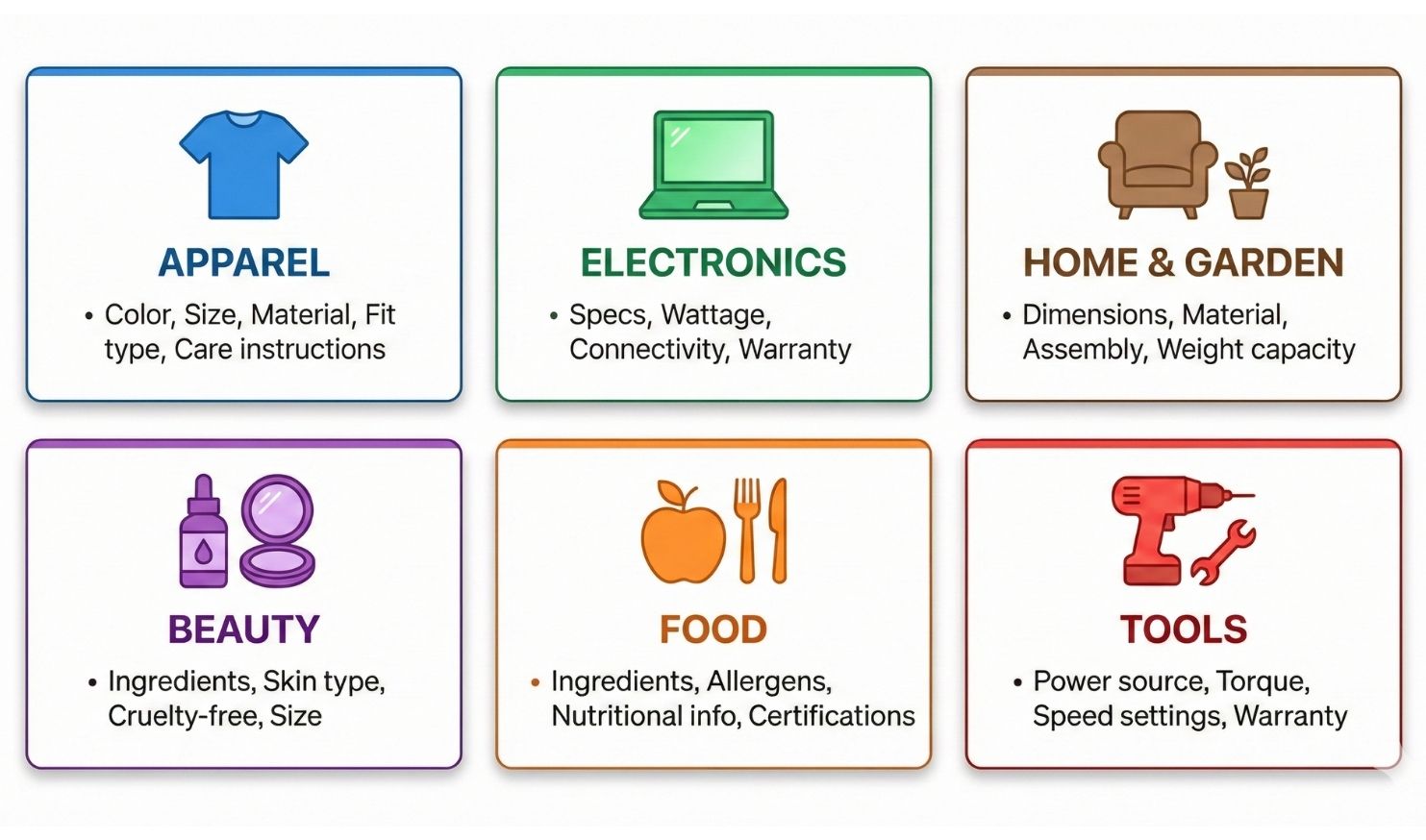
Apparel and Accessories
Must-have attributes:
- color: Exact color name (not just “blue,” but “navy blue” or “midnight blue”)
- pattern: Solid, striped, floral, geometric, etc.
- size: With size system (US, EU, UK)
- material: Fabric composition with percentages
- care_instructions: Wash/dry details
- fit_type: How it fits (slim, regular, relaxed)
- gender: Target gender
- occasion: Casual, formal, athletic, etc.
Common mistakes:
- Vague colors (“multicolor” instead of “red and white striped”)
- Missing size conversions
- No care instructions
- Generic descriptions (“comfortable shirt” vs “moisture-wicking performance fabric”)
Electronics and Appliances
Must-have attributes:
- brand: Official brand name
- model_number: Exact model
- wattage/voltage: Power requirements
- connectivity: WiFi, Bluetooth, wired
- compatibility: Works with what systems/devices
- dimensions: Exact measurements for fit
- weight: Actual weight
- energy_rating: Energy Star rating if applicable
- warranty: Length and type
Common mistakes:
- Missing technical specs (assumes customers know)
- No compatibility information
- Unclear power requirements
- Missing certifications (UL, FCC, Energy Star)
Home and Garden
Must-have attributes:
- material: What it’s made from
- dimensions: Exact size
- weight_capacity: Max weight it can hold (furniture, shelves)
- weather_resistance: Indoor/outdoor, UV resistant
- assembly_required: Yes/no + estimated time
- care_instructions: Cleaning and maintenance
- color_options: Available colors
- style: Modern, traditional, rustic, etc.
Common mistakes:
- Photos that don’t show scale
- Missing assembly information
- No weather/durability details
- Vague style descriptions
Beauty and Personal Care
Must-have attributes:
- ingredients: Full ingredient list
- skin_type: Dry, oily, combination, sensitive
- scent: Fragrance description or “unscented”
- size: Volume with units (8 fl oz, 250ml)
- cruelty_free: Yes/no
- vegan: Yes/no
- organic_certified: Certification if applicable
- expiration_info: Shelf life or PAO (period after opening)
- allergen_info: Common allergens present/absent
Common mistakes:
- Hiding ingredient lists
- No skin type guidance
- Missing certifications (customers actively search for these)
- Unclear size information
Food and Beverage
Must-have attributes:
- ingredients: Complete list in order
- nutritional_info: Calories, fat, protein, carbs per serving
- allergens: Contains/free from (gluten, nuts, dairy, etc.)
- dietary_certifications: Organic, kosher, halal, vegan, keto
- serving_size: How much is one serving
- servings_per_container: Total servings
- expiration_info: Best by date or shelf life
- storage_requirements: Refrigerate after opening, etc.
- origin: Country/region of origin
Common mistakes:
- Incomplete allergen information (liability risk)
- Missing certifications
- Vague serving sizes
- No storage instructions
Real-Time Data Requirements: Inventory and Shipping
AI agents need certainty about availability and delivery. Stale data kills conversions.
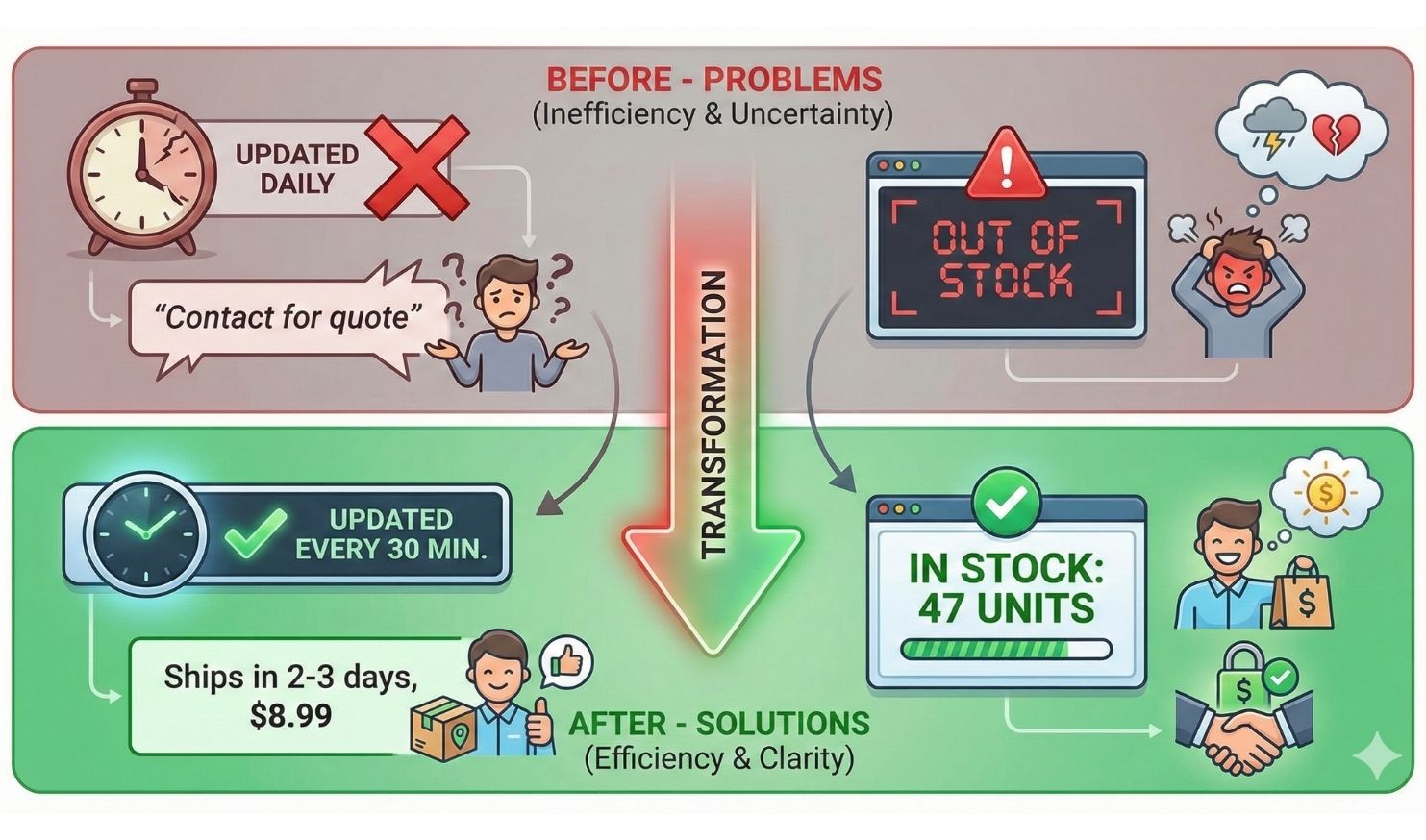
AI agents need certainty about availability and delivery. Stale data kills conversions.
Inventory Sync Frequency
Your feed needs to reflect actual stock levels, not approximate availability.
Minimum standards:
- High-velocity items: Update every 15-30 minutes
- Medium-velocity items: Update every 1-2 hours
- Low-velocity items: Update daily
- Made-to-order items: Always “in stock” with lead time noted
Why this matters: If your feed says “in stock” but you’re actually out, the AI tries to complete the transaction and hits a MERCHANDISE_NOT_AVAILABLE error. Each error damages your reliability score, and the AI starts showing you less frequently.
How to implement:
- Shopify: Automatic with Merchant Center integration
- WooCommerce: Use plugins like “Google Product Feed” with scheduled sync
- Custom platforms: Build webhook that pings Google when inventory changes
Advanced Availability States
Don’t just use “in stock” or “out of stock.” Use precise states.
Available states:
- in stock: Available now
- out of stock: Not available, no restock date
- preorder: Available for advance purchase
- backorder: Out of stock but accepting orders with delay
- available for order: Made-to-order items
- limited availability: Low stock
Include lead times:
- availability_date: When preorder ships
- min_handling_time: Days to process order
- max_handling_time: Maximum processing time
Example: Product A: availability: in stock, max_handling_time: 1 day Product B: availability: backorder, availability_date: 2026-02-15
AI recommends Product A to customers who need it fast, Product B to customers who can wait.
Shipping Configuration
Vague shipping kills AI recommendations.
What breaks visibility:
- “Contact us for shipping quote”
- “Shipping calculated at checkout” (without structured rates)
- Missing international shipping data
- No dimension/weight data (affects shipping cost calculation)
What AI agents need:
- Precise shipping zones with rates
- Dimensional weight (length x width x height, actual weight)
- Handling time (days to ship)
- Carrier information (USPS, UPS, FedEx)
- Delivery estimates by zone
Example of good data:
shipping_weight: 2.5 lbs
shipping_dimensions: 12″ x 8″ x 4″
ships_from: Michigan, US
domestic_shipping_time: 2-5 business days
domestic_shipping_cost: $8.99 (flat rate)
international_shipping: Canada, UK (rates calculated by zone)
Example of bad data:
shipping: varies by location
The first one lets the AI give a delivery estimate. The second one can’t answer “when will this arrive?”
Save Yourself the Headache and Let us Handle Your Fulfillment!
See How Using a 3PL for saves Apparel sellers time. Get a Free Quote from eFulfillment Service Today!
Quality Scoring: How Google Evaluates Your Feed
Google doesn’t just check if data exists. It scores quality.
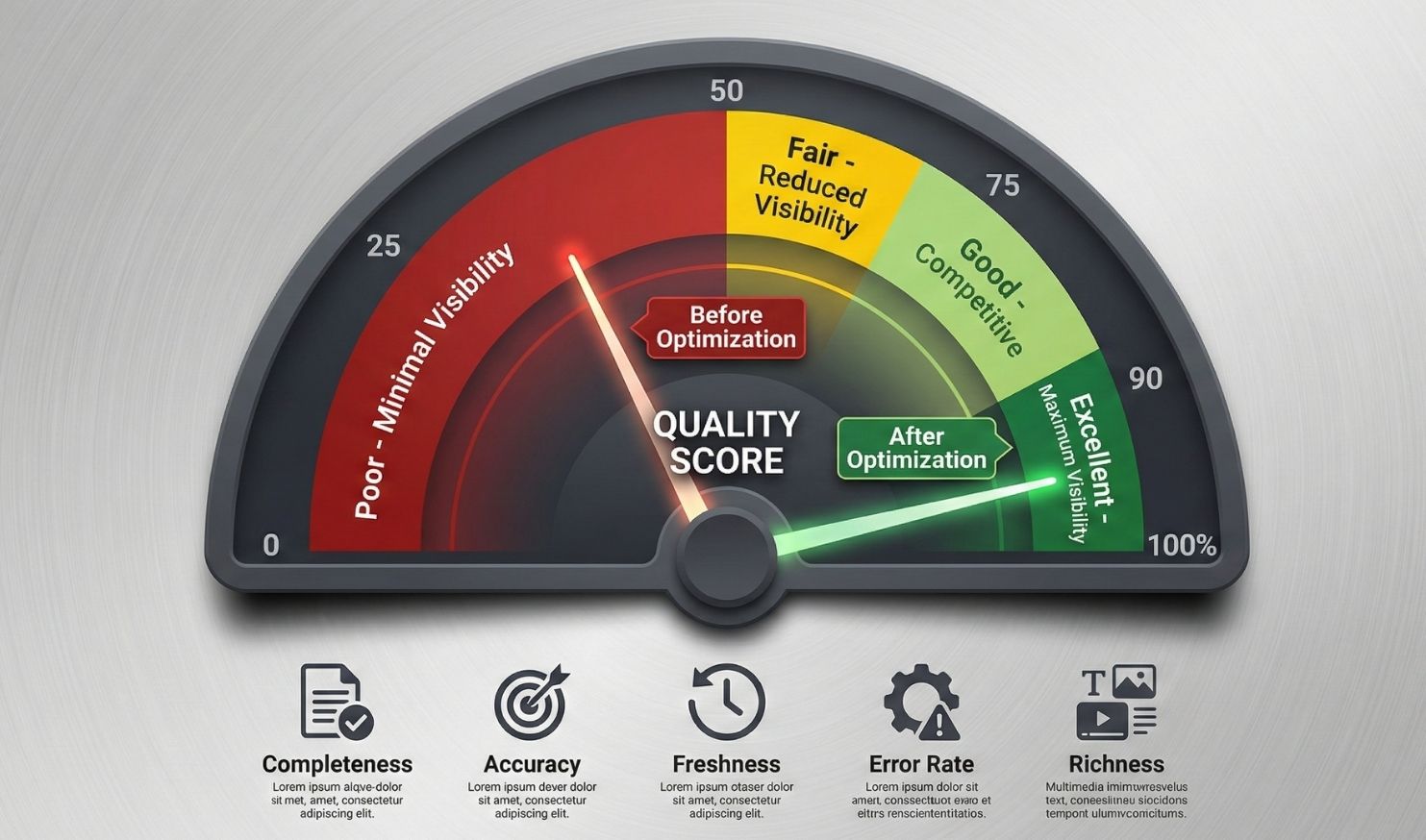
The Data Quality Score
Your Merchant Center account has a data quality score based on:
- Completeness: Percentage of recommended attributes filled
- Accuracy: Does feed data match website data?
- Freshness: How often is data updated?
- Error rate: How many products have policy violations or mismatches?
- Richness: Do you use enhanced attributes (Q&A, scenarios, etc.)?
Scoring thresholds (estimated):
- 90-100%: Excellent (maximum AI visibility)
- 70-89%: Good (competitive visibility)
- 50-69%: Fair (reduced visibility)
- Below 50%: Poor (minimal AI recommendations)
Common Quality Issues That Tank Your Score
Price mismatch: Feed says $99, website says $119. AI flags this as unreliable data. Fix: automated price sync.
Image quality issues: Blurry images, watermarks, promotional text on images. Fix: clean product photos, lifestyle shots as additional images.
Generic titles: “Blue Shirt” vs “Men’s Blue Oxford Button-Down Shirt – Slim Fit – 100% Cotton.” Fix: descriptive, attribute-rich titles.
Missing GTIN for branded products: Google requires UPC/EAN for products from known brands. Fix: add barcodes to feed.
Prohibited content: Before/after images for health products, unrealistic claims, missing age restrictions. Fix: review Google’s policies.
Category mismatches: Product in wrong category (affects search matching). Fix: use Google’s Product Category taxonomy correctly.
How to Check Your Current Score
- Log into Google Merchant Center
- Go to “Products” > “Diagnostics”
- Check “Data quality” tab
- Review flagged issues by severity (critical, warning, info)
Priority fix order:
- Critical errors (prevent products from showing)
- Price/availability mismatches (hurt trust)
- Missing required attributes (reduce matching)
- Missing recommended attributes (reduce competitiveness)
- Enhanced attributes (maximize AI optimization)
Implementation: Tools and Workflow
You don’t need to manually edit thousands of products. Here’s how to scale.
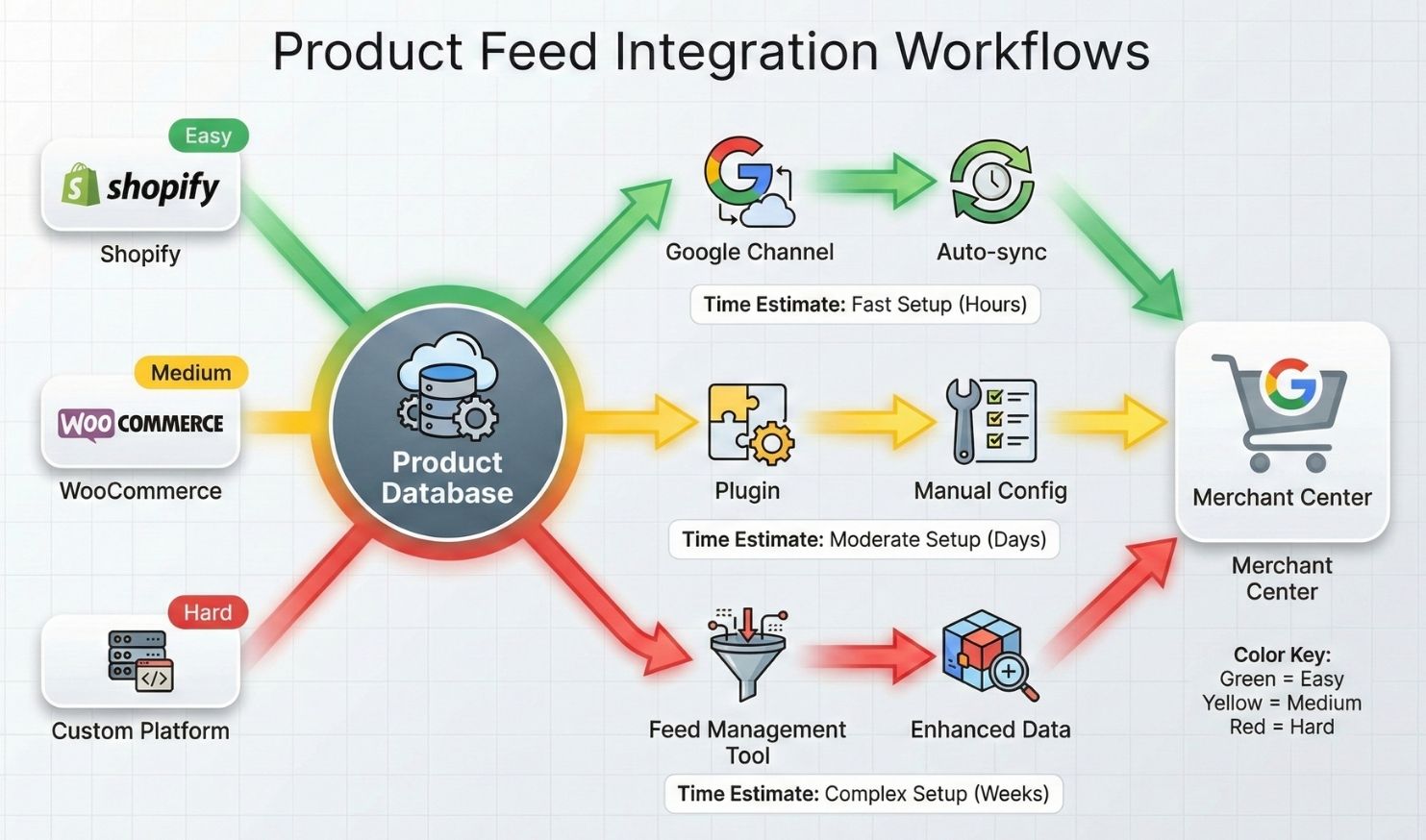
For Shopify Stores
Built-in tools:
- Shopify’s native Google channel (auto-syncs basic data)
- Bulk editor for updating multiple products
- Metafields for custom attributes
- Apps marketplace for feed optimization
Recommended apps:
- AdNabu: AI-powered feed optimization, auto-fills missing attributes
- Simprosys Google Shopping Feed: Advanced attribute mapping
- Shopify Flow: Automate feed updates based on inventory changes
Workflow:
- Install Google channel and sync Merchant Center
- Use bulk editor to add missing attributes to top 20% of products
- Install feed optimization app for automated enhancement
- Set up Shopify Flow rules for real-time inventory updates
- Review Merchant Center diagnostics weekly
For WooCommerce Stores
Required plugins:
- WooCommerce Google Product Feed (or similar)
- Advanced Custom Fields (for extra attributes)
- WooCommerce Product Attributes plugin
Workflow:
- Install and configure Google Product Feed plugin
- Map WooCommerce fields to Google attributes
- Create custom fields for missing attributes (Q&A, scenarios, etc.)
- Set up automated feed generation (hourly or daily)
- Use CSV bulk import for mass attribute updates
Pro tip: Export your products to CSV, add all missing attributes in a spreadsheet with formulas and bulk data entry, then re-import. Faster than editing one by one.
For Enterprise/Custom Platforms
Feed management platforms:
- GoDataFeed: Multi-channel feed optimization
- Feedonomics: Enterprise feed management with AI optimization
- ChannelAdvisor: Marketplace and feed management
- DataFeedWatch: Feed customization and optimization
These platforms sit between your ecommerce system and Google, allowing you to transform and enhance data without changing your core platform.
Bulk Optimization Techniques
Use spreadsheet formulas to auto-generate descriptions:
=CONCATENATE(A2, “ – “, B2, “ – “, C2, “ material – “, D2, “ – Size “, E2)
// Generates: “Men’s Hiking Boots – Waterproof – Leather material – Brown – Size 10″
Create attribute templates by category: For all “outdoor furniture,” bulk apply:
- weather_resistance: all-weather rated
- care_instructions: wipe clean with damp cloth
- warranty: 2-year limited warranty
Use AI to generate Q&A pairs: Feed your product title and description into ChatGPT or Claude: “Generate 5 common customer questions and answers for this product: [paste product info]”
Copy the output into your feed. Faster than writing from scratch.
Testing and Monitoring Your Optimizations
Don’t just optimize and forget. Measure impact.
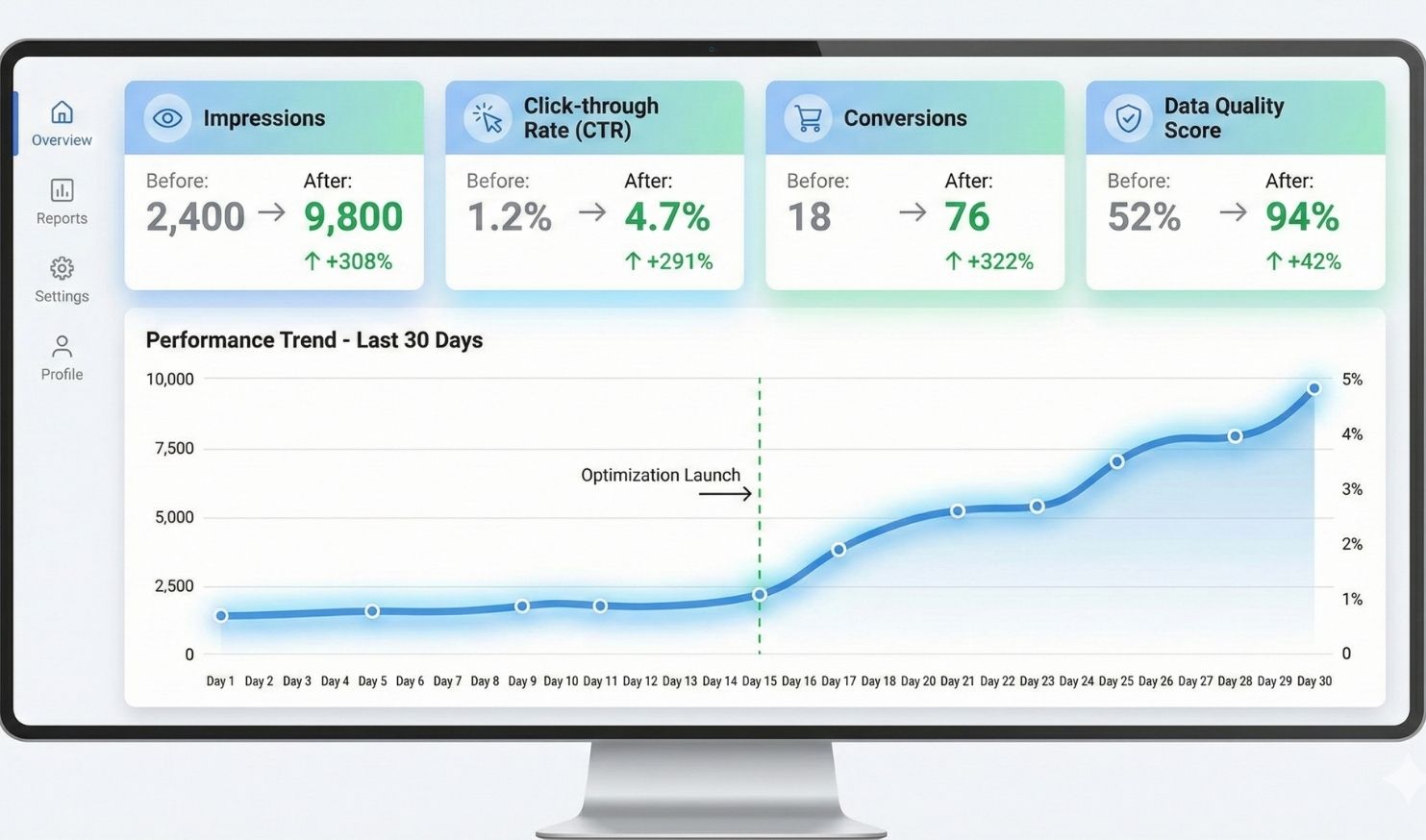
Before/After Metrics to Track
In Google Merchant Center:
- Impressions (how often your products appear in AI results)
- Clicks (engagement rate)
- Click-through rate (CTR)
- Conversions (purchases via AI Mode)
- Data quality score
On your ecommerce platform:
- Traffic from Google Shopping
- Conversion rate by traffic source
- Average order value from AI Mode customers
- Return rate (better data should reduce returns)
Set baselines: Before optimizing, record your current metrics. After 30 days of optimization, compare.
Testing Your AI Visibility
Manual testing:
- Open Google AI Mode or Gemini app
- Search for your product category with specific attributes
- Example: “waterproof hiking boots size 10 under $150”
- See if your products appear in recommendations
- Ask follow-up questions the AI should be able to answer from your data
- “Are any of these machine washable?”
- “Which has the best warranty?”
- “Show me eco-friendly options”
- Note which products appear and which don’t
What to look for:
- Products with complete data should appear first
- AI should confidently answer attribute questions
- Your Business Agent should pop up when searching your brand
If your products don’t appear:
- Check data quality score in Merchant Center
- Verify products are approved (no policy violations)
- Ensure attributes match the search query
- Confirm inventory is showing as available
A/B Testing Attributes
Test which enhancements drive the most impact.
Test 1: Product titles
- Control: “Rug 5×7 Blue”
- Test: “Hand-Knotted Wool Area Rug 5×7 – Navy Blue – Modern Geometric Pattern”
- Measure: Impressions and CTR over 14 days
Test 2: Q&A additions
- Control group: 100 products without Q&A
- Test group: 100 products with 5+ Q&A pairs
- Measure: Engagement rate and conversion rate
Test 3: Image quality
- Control: Single product image on white background
- Test: Multiple images (product + lifestyle + detail shots)
- Measure: Click-through and conversion
Monthly Optimization Routine
Week 1: Data audit
- Check Merchant Center diagnostics
- Fix any new critical errors
- Review products with declining impressions
Week 2: Attribute enrichment
- Add 5-10 Q&A pairs to top products
- Fill in missing optional attributes
- Update seasonal attributes (e.g., “perfect for spring”)
Week 3: Competitive analysis
- Search for your products in AI Mode
- See who else appears
- Identify attributes competitors have that you don’t
- Add those attributes to your products
Week 4: Performance review
- Analyze which products gained visibility
- Identify which attributes correlated with improvement
- Plan next month’s optimization priorities
Tools and Resources
Free Tools
Google Merchant Center Diagnostics: Built-in data quality checker. Use this weekly.
Google’s Product Data Specification: Official list of all attributes by category. Bookmark this: https://support.google.com/merchants/answer/7052112
Merchant Center Academy: Free training courses on feed optimization.
Paid Tools
Feed Optimization Platforms:
- AdNabu (Shopify): $9.99/month starting
- Feedonomics: Enterprise pricing, contact for quote
- GoDataFeed: $79/month starting
Analytics and Monitoring:
- DataFeedWatch: $69/month starting
- ChannelAdvisor: Enterprise only
Community Resources
Reddit Communities:
- r/ecommerce
- r/PPC
- r/shopify
Industry Blogs:
The Bottom Line
Product data optimization isn’t optional anymore. It’s the price of admission to AI commerce.
Every incomplete attribute is a lost sale. Every vague description is a customer who gets recommended to your competitor instead. Every missing Q&A pair is a question your Business Agent can’t answer.
The stores that win in 2026 are the ones treating their product feed like their website used to be treated: as the primary customer touchpoint that deserves constant attention and refinement.
Start with your top products. Get them to 95%+ attribute completion. Add the conversational commerce fields that competitors are still ignoring. Set up real-time sync so the AI trusts your data.
Then watch what happens when an AI agent with perfect memory of your entire catalog can instantly answer any customer question and complete the transaction without friction.
That’s the competitive advantage of complete data.
Sources
- What UCP Means for Ecommerce SEO – Aleyda Solis: https://www.aleydasolis.com/en/search-engine-optimization/ugc-agentic-commerce-seo/
- Product data specification – Google Merchant Center Help: https://support.google.com/merchants/answer/7052112
- About product data specifications – Google Merchant Center Help: https://support.google.com/merchants/answer/188494
- Get started with Business Agent – Google Merchant Center Help: https://support.google.com/merchants/answer/16410382
- Agentic commerce – Shopify Dev Docs: https://shopify.dev/docs/agents
- New tech and tools for retailers – Google Blog: https://blog.google/products/ads-commerce/agentic-commerce-ai-tools-protocol-retailers-platforms/
- Google Shopping Feed Optimization Guide – Practical Ecommerce: https://www.practicalecommerce.com/google-shopping-feed-optimization


0 Comments