
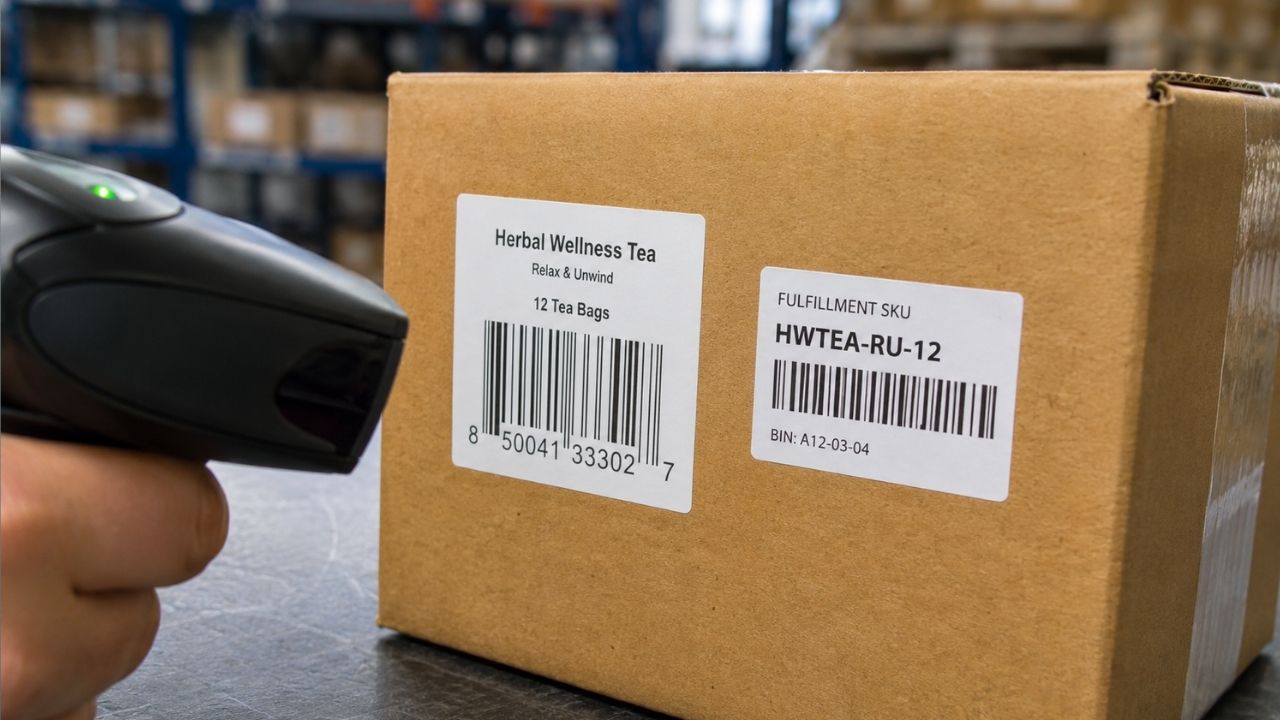
Your best-selling mug shows up “suppressed” in Amazon Seller Central. No warning, no context, just a red flag on the listing and a note buried in a support thread: barcode mismatch.
You check your product page. The UPC is right there, printed on the label, scanned a hundred times without issue. What Amazon actually flagged wasn’t the UPC. It was the fact that your internal SKU had been entered into the wrong field during a catalog upload, and the system read it as a barcode that didn’t exist in the GS1 database.
That mix-up, SKU where a UPC belongs, is one of the most common and most avoidable catalog errors in ecommerce. It happens because SKU, UPC, and barcode get used interchangeably in casual conversation even though they’re three different things doing three different jobs. Here’s the actual difference, plus the parts most explanations skip.
Quick answer: SKU vs UPC vs barcode
| SKU | UPC | Barcode | |
|---|---|---|---|
| What it is | An internal product code you create | A globally unique product identifier | A machine-readable symbol that encodes a code |
| Who creates it | You (or your team) | GS1, through a licensed prefix | A label or design tool, based on a UPC, SKU, or other code |
| Format | Alphanumeric, any structure you choose | 12 numeric digits, standardized | Lines, spaces, or a grid pattern, depending on type |
| Where it’s used | Your own inventory system, warehouse, POS | Retail point-of-sale, marketplaces, wholesale | Anywhere a scanner needs to read a code fast |
| Can it change? | Yes, it’s yours to edit | No, once assigned to a product it stays fixed | N/A, it just displays whatever code it’s printed with |
The short version: a SKU is a label you invent for your own use. A UPC is a number the industry agrees means one specific product, everywhere. A barcode is neither of those. It’s the printed pattern that lets a scanner read a SKU, a UPC, or several other kinds of codes without a person typing anything in by hand.
What is a SKU?
SKU stands for stock keeping unit. It’s a code you create, internally, to track a specific product variant in your own systems: your inventory software, your warehouse bins, your point-of-sale system, your 3PL’s dashboard.
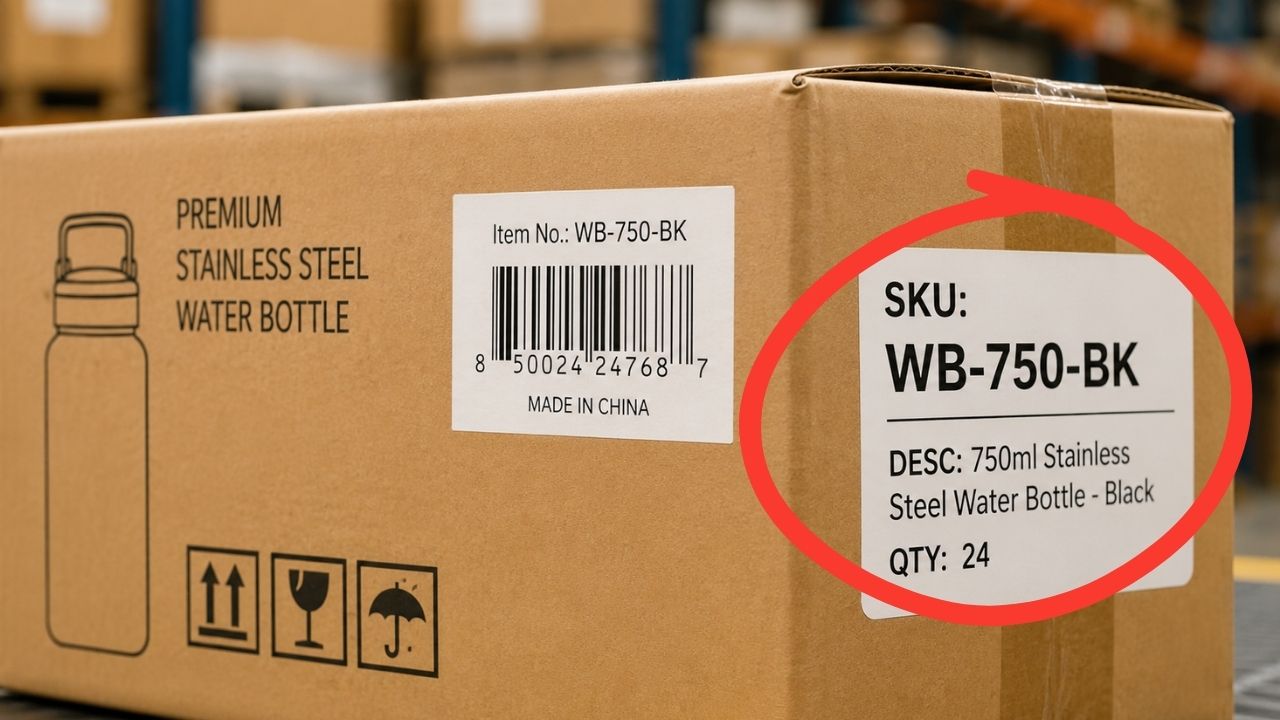
Nobody outside your business needs to recognize a SKU or agree on its format. A coffee roaster selling three roast levels in two bag sizes might build SKUs like this:
- DKRST-12OZ (Dark Roast, 12 ounces)
- DKRST-5LB (Dark Roast, 5-pound bag)
- MED-12OZ (Medium Roast, 12 ounces)
That structure works because it means something to the roaster’s own team. A different company selling the exact same coffee could use a completely different SKU format for the same product, and both would be correct. SKUs aren’t standardized, and that’s the point: they’re built to serve your operation, not an industry-wide database.
What is a UPC?
UPC stands for Universal Product Code. It’s a 12-digit number, standardized by GS1, the nonprofit that manages global product identification. Unlike a SKU, a UPC has to be unique across every company on earth selling under that number. Two different sellers can never legitimately have the same UPC on two different products.
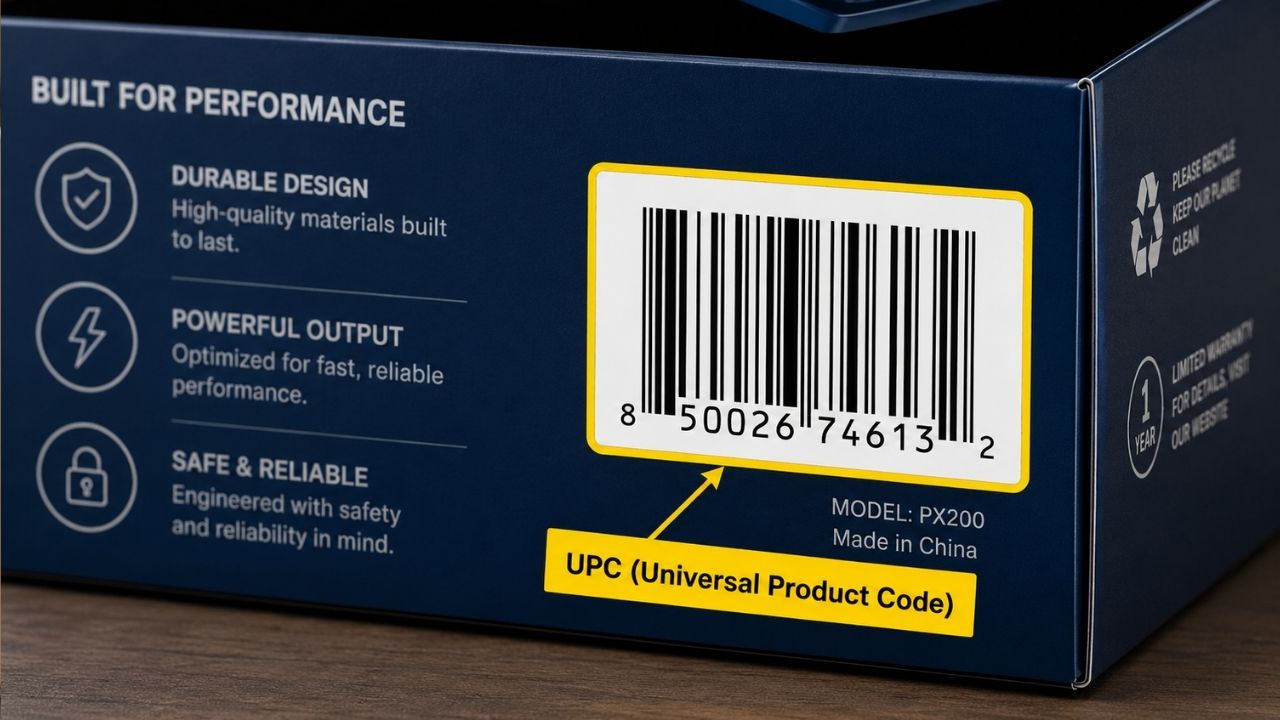
A UPC has two parts baked into its 12 digits: a company prefix, licensed from GS1, and a product number your company assigns within that prefix. The last digit is a check digit, which exists purely to catch scanning and data-entry errors (more on exactly how that works below).
Once a UPC is assigned to a product, it’s meant to stay fixed for the life of that product. Retailers, marketplaces, and distributors all key off that number to know they’re talking about the same item, which is exactly why UPCs can’t be reused the way a SKU can.
What is a barcode (and why there are several kinds)
A barcode isn’t a type of code. It’s a visual format for displaying a code so a scanner can read it in a fraction of a second instead of a person typing it in.
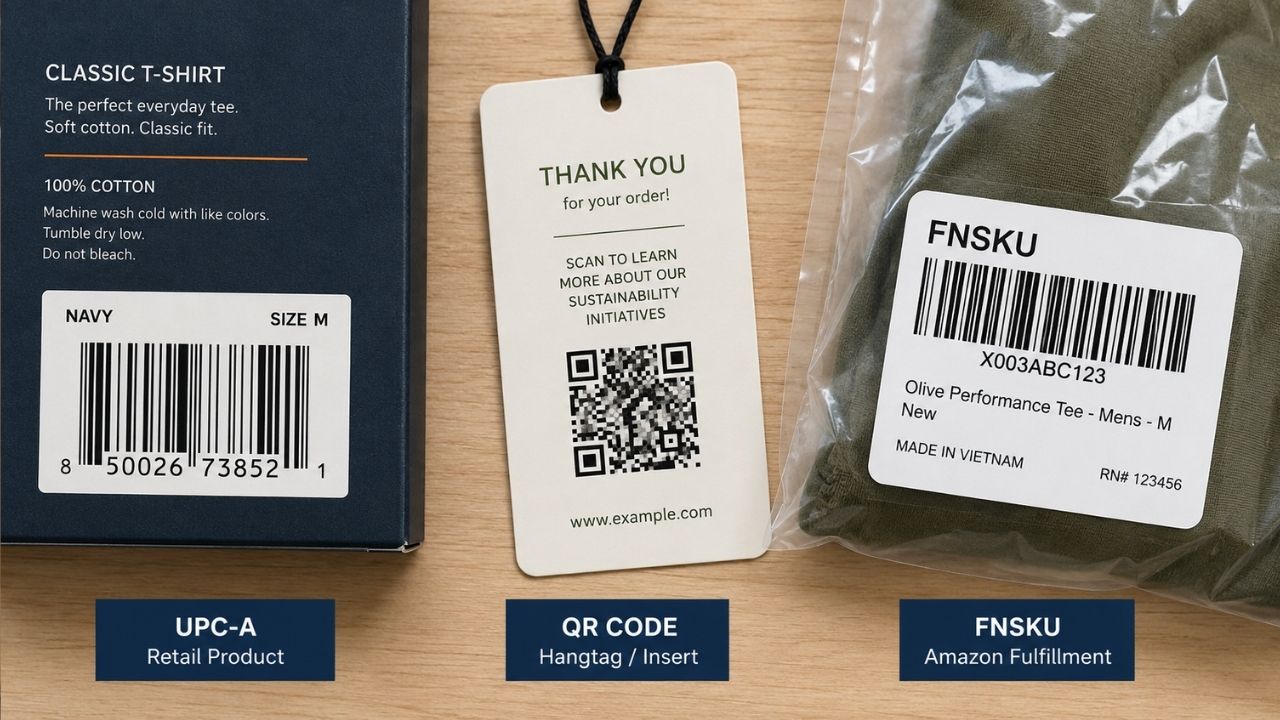
A UPC gets printed as a barcode. So can a SKU. So can several other kinds of identifiers, each suited to a different job:
|
Barcode type |
What it encodes |
Where you’ll see it |
|---|---|---|
|
UPC-A |
A 12-digit UPC |
Retail shelves in North America |
|
EAN-13 |
A 13-digit GTIN |
Retail shelves outside North America |
|
Code 128 |
Any alphanumeric string, including a raw SKU |
Shipping labels, internal warehouse tracking |
|
ITF-14 |
A 14-digit GTIN |
Case and pallet packaging, not individual retail units |
|
QR code |
A URL, a long alphanumeric string, or embedded data |
Marketing, product pages, mobile scanning |
|
FNSKU |
Amazon’s own internal label, distinct from a UPC |
Amazon FBA inventory only |
That last one trips up a lot of new Amazon sellers. An FNSKU looks and scans like a barcode, but it isn’t a UPC and it isn’t GS1-registered. Amazon generates it to track inventory inside its own fulfillment network, and it exists specifically so your units don’t get commingled with another seller’s stock of the “same” product. Cover the manufacturer UPC and apply the FNSKU correctly, and Amazon can tell your inventory apart from everyone else’s. Mix the two up, and that’s a fast route to a suppressed listing.
What a UPC actually costs
GS1 US licenses UPCs directly, and the price depends on how many products you need to cover, not a flat per-barcode fee.

|
Option |
Products covered |
Initial cost |
|---|---|---|
|
Single GTIN |
1 product |
$30, one-time, no annual renewal |
|
Company prefix, smallest tier |
Up to 10 products |
$250 |
|
Company prefix |
Up to 100 products |
$750 |
|
Company prefix |
Up to 1,000 products |
$2,500 |
|
Company prefix |
Up to 10,000 products |
$6,500 |
|
Company prefix |
Up to 100,000 products |
$10,500 |
A company prefix, not a single GTIN, is almost always the better move if you plan to launch more than one or two products, since the per-barcode cost drops fast as capacity goes up. Beyond the initial license, GS1 also charges an annual renewal fee to keep a company prefix active, which is worth budgeting for before you print your first label. Buy directly from GS1 rather than a reseller: resold or non-GS1-issued “UPC” numbers can fail retailer and marketplace verification, since the license traces back to a different company than the one selling the product.
Setting up SKUs and barcodes for your first 3PL?
Getting your product identifiers right before inventory ships out saves a receiving delay later. eFulfillment Service’s team checks SKU and barcode setup as part of onboarding, not after something goes wrong.
The check digit: how a barcode catches its own mistakes
Every GS1 barcode, whether it’s a UPC-A, an EAN-13, or a GTIN-14, ends in a check digit. It isn’t part of the product identifier. It exists purely so a scanner (or a human keying in the number by hand) can catch a misread or a typo before bad data enters the system.
Here’s how it’s calculated, using the GS1 Mod-10 method:
- Starting from the rightmost digit before the check digit, multiply every other digit by 3, and leave the rest as-is.
- Add up all the results.
- Subtract the total’s last digit from 10. That result is the check digit. (If the total already ends in 0, the check digit is 0.)
Take the 11-digit payload 01234567890. Running the Mod-10 calculation on those digits produces a sum of 85. Ten minus the last digit of that sum (5) equals 5, so the check digit is 5, and the full 12-digit UPC becomes 012345678905.
If one digit in that code gets transposed or misread during a scan, this math no longer checks out, and the scanner rejects the read instead of silently recording the wrong product. That’s the entire reason barcodes catch far fewer errors than manual SKU entry: the check digit is built to fail loudly.
SKU vs UPC: which do you actually need?
Most ecommerce sellers need both, just for different purposes. Here’s how to tell which one matters for a given situation:
You need a SKU if:
- You track inventory in any system, spreadsheet, POS, or warehouse software
- You sell product variants (size, color, bundle) that need to be told apart internally
- You want a fast way to identify a product on a pick list or packing slip
You need a UPC if:
- You sell on a marketplace that requires one (most do, with some exceptions)
- You sell wholesale or through a retailer that scans products at checkout
- You want your product to show up correctly across multiple sales channels without manual matching
You can usually skip a UPC if:
- You sell exclusively direct-to-consumer through your own website
- Your ecommerce platform and 3PL can operate entirely off internal SKUs (most Shopify-based DTC brands fall here)
- You’re pre-launch and testing demand before committing to a GS1 prefix
A SKU can’t substitute for a UPC once a retailer or marketplace requires one, since a UPC has to trace back to a real, licensed GS1 prefix to pass verification. But plenty of DTC-only brands run for years on SKUs alone and never need a UPC at all.
Not sure if your current setup will pass marketplace verification?
A mismatched SKU-to-barcode mapping is one of the most common causes of listing suppression. eFulfillment Service reviews your product identifiers as part of Amazon FBA prep, not as a separate line item.
What different marketplaces and retailers require
Requirements vary more than most sellers expect, and getting this wrong after your catalog is live costs real time to fix.

|
Channel |
Barcode requirement |
|---|---|
|
Amazon (FBA) |
UPC required for most categories, unless you’re brand-registered and use GS1-exempt ASINs. Physical units get an FNSKU label, separate from the UPC, once they enter Amazon’s warehouse. |
|
Amazon (FBM) |
Same UPC requirements as FBA, but no FNSKU since Amazon never physically handles the inventory. |
|
Walmart Marketplace |
GTIN (typically a UPC) required for nearly all listings, with limited exceptions for private-label items enrolled in Walmart’s GTIN exemption program. |
|
eBay |
UPC recommended, not always required, but listings without one rank worse in eBay’s own search. |
|
Shopify (your own store) |
No requirement at all. Shopify treats the barcode field as optional metadata, not a listing requirement. |
|
Traditional wholesale/retail |
UPC essentially mandatory. Retail POS systems are built around scanning a standardized code at checkout. |
Amazon’s FNSKU rule catches the most sellers off guard, since it’s easy to assume “I already have a UPC” covers Amazon’s requirements completely. It covers the product identification piece. It doesn’t replace the FNSKU labeling step required once your inventory physically enters an Amazon fulfillment center.
Selling on Amazon FBA and want the barcode setup handled correctly the first time?
FNSKU labeling, UPC verification, and prep compliance are easy to get wrong on your own. See what’s actually involved before your inventory ships to Amazon.
How SKUs and barcodes work inside a 3PL warehouse
This is the part most SKU/UPC explainers skip entirely, and it’s where a lot of the real-world confusion actually causes problems.

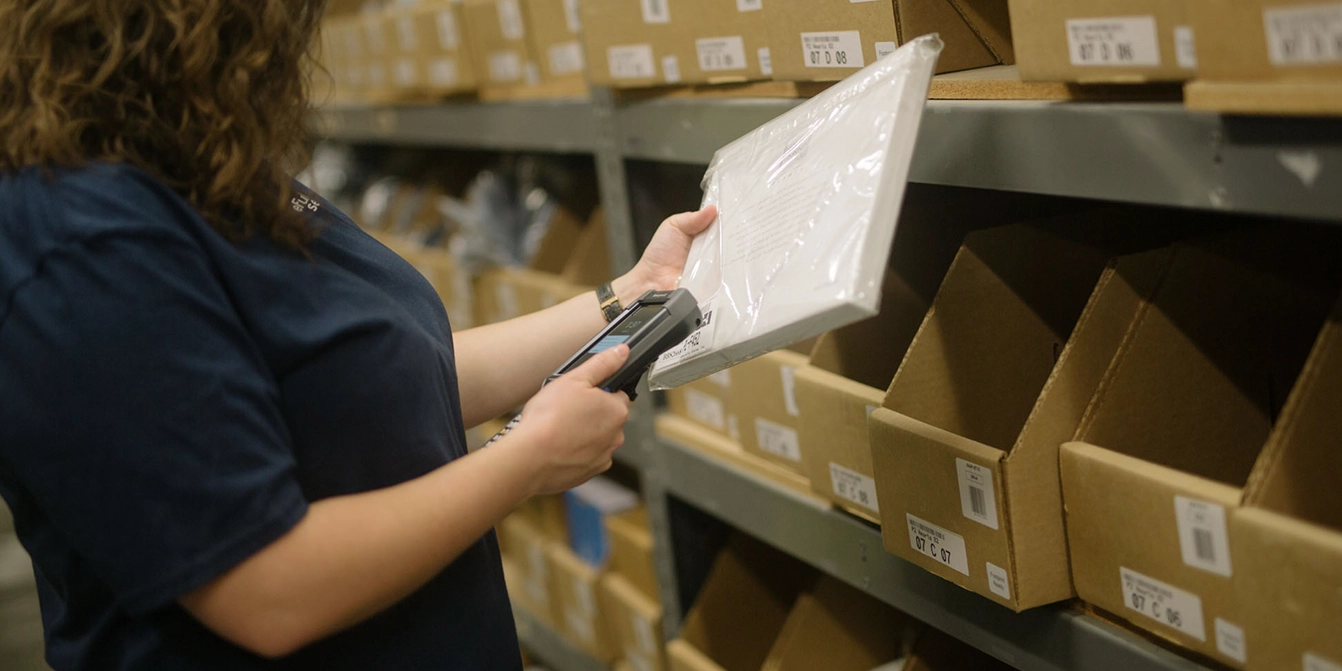
When inventory arrives at a 3PL’s warehouse, the receiving team checks it in against your SKU list, not the UPC. Your SKU is what maps a physical unit to a specific bin location, a specific quantity, and a specific listing on your sales channels. The UPC (or FNSKU, for Amazon-bound inventory) is what gets scanned at the pack station to confirm the right item is going into the right box before it ships.
That two-layer system is why a clean SKU structure matters even if you never plan to sell wholesale or touch a UPC at all:
- Bin accuracy. A warehouse management system assigns each SKU to a specific location. A vague or duplicated SKU makes it easy for a picker to grab the wrong variant, especially with size or color runs that look nearly identical on the shelf.
- Cycle counts. Regular inventory counts reconcile physical stock against what your system says you have, SKU by SKU. Clean, consistent SKUs make discrepancies easy to spot. Messy ones hide them.
- Order accuracy. The scan-to-verify step at packing catches wrong-item errors before they ship, but only if the barcode being scanned actually matches what the system expects for that SKU.
A well-run warehouse receiving process checks that your SKUs and barcodes line up correctly before your first unit ever gets shelved, which is a far cheaper place to catch a mismatch than after a customer gets the wrong item.
Managing SKUs across sizes, colors, or bundles?
Variant-heavy catalogs are where SKU structure matters most, and where it’s easiest to get wrong. See how apparel and multi-variant brands typically structure their systems.
Common SKU and barcode mistakes
- Reusing a SKU for a discontinued product. Old sales history, returns data, and reorder points all point to a SKU that no longer means what your records think it means.
- Building SKUs with special characters or spaces. Some inventory systems and marketplace integrations choke on characters like /, #, or a leading zero, silently truncating or misreading the SKU.
- Entering a SKU into a UPC field, or the reverse. This is exactly what caused the suppressed listing at the start of this article, and it’s a one-field mistake that a bulk catalog upload makes easy to miss.
- Buying UPCs from a reseller instead of GS1 directly. A resold UPC that traces back to a different company’s GS1 prefix can fail Amazon and Walmart’s ownership verification even though the number itself scans fine.
- Skipping a barcode audit after a product relaunch. A reformulated or resized product often needs a new UPC, not the same one carried over, since the UPC is meant to represent one specific, unchanged product.
- Assuming your lot or batch tracking can run off UPC alone. UPCs identify a product, not a specific lot or expiration date. Lot-sensitive categories need SKU-level or lot-level tracking layered on top.
Cleaning up a messy SKU catalog before you switch fulfillment partners?
A 3PL that audits your product identifiers during onboarding catches these mistakes before they become customer-facing problems.
Frequently asked questions
What’s the difference between a UPC and a GTIN?
A GTIN (Global Trade Item Number) is the broader category. A UPC is a 12-digit GTIN used mainly in North America. EAN-13, used in most of the rest of the world, is also a type of GTIN. In practice, if you’re selling in the US, “UPC” and “GTIN” usually refer to the same number.
Can I use my SKU as my barcode instead of buying a UPC?
Yes, internally. You can print your SKU as a Code 128 barcode for your own warehouse or POS use without ever touching GS1. What you can’t do is use that SKU-based barcode to satisfy a marketplace or retailer’s UPC requirement, since it isn’t a registered, globally unique identifier.
Does Shopify require a UPC?
No. Shopify’s barcode field is optional and accepts any code, including a self-generated SKU-based barcode. A UPC only becomes necessary the moment you list on a marketplace or retailer that requires one.
What’s the difference between a UPC and an ASIN?
A UPC identifies a product globally, across every retailer and marketplace. An ASIN (Amazon Standard Identification Number) identifies a product specifically within Amazon’s own catalog and gets generated by Amazon, not GS1. A single product typically has one UPC and one ASIN, and the two aren’t interchangeable outside Amazon.
Why did my Amazon listing get suppressed over a barcode issue?
The most common cause is a UPC that doesn’t match GS1’s registry for your brand, often because it was entered incorrectly, purchased from a non-GS1 source, or accidentally swapped with an internal SKU during a catalog upload. Amazon’s verification checks the UPC against GS1’s database directly.
Do I need a different UPC for each product variant?
Generally, yes. Each distinct size, color, or bundle that a customer could purchase separately needs its own UPC if you’re selling anywhere that requires one, since a UPC is meant to represent one specific, purchasable item.
How long does it take to get a UPC from GS1?
Licensing is typically instant to same-day once payment processes, since GS1’s system generates the prefix and available GTINs automatically. Getting the barcode printed, tested, and onto packaging takes longer and depends on your production timeline, not GS1.
Key Takeaways
- A SKU, a UPC, and a barcode are three different things, not three names for one thing. A SKU is your internal code, a UPC is a globally unique product identifier, and a barcode is just the printed symbol that lets either one get scanned.
- A UPC costs money and scales with how many products you need to cover. A single GTIN runs $30, while a company prefix for up to 100,000 products runs $10,500, plus an annual renewal fee either way.
- The check digit exists to catch errors, not to identify the product. Every GS1 barcode uses the same Mod-10 formula, and a mismatched check digit causes a scanner to reject the read instead of recording bad data.
- Amazon’s FNSKU is not a UPC, and mixing the two up is a common cause of suppressed listings. A UPC identifies the product to the world; an FNSKU identifies your specific inventory inside Amazon’s warehouse network.
- Most DTC-only sellers can run entirely on SKUs and skip a UPC. A UPC only becomes necessary the moment you sell somewhere that requires one, such as a marketplace, wholesale account, or traditional retailer.
- Inside a 3PL warehouse, SKUs and barcodes do different jobs at different points in the process. SKUs drive bin assignment and cycle counts; barcodes get scanned at receiving and packing to confirm the right item is moving.
Quick reference checklist
Before you list a new product anywhere outside your own website, confirm:
- Every variant has its own internal SKU, with no duplicates or reused codes from discontinued products
- You know whether your sales channels actually require a UPC, or whether SKUs alone will cover it
- Any UPC in use was purchased directly from GS1, not a reseller
- Your SKU and UPC are entered in the correct fields in your catalog system, not swapped
- If you sell on Amazon FBA, your FNSKU labeling is set up separately from your UPC
- Your 3PL or warehouse team has confirmed your barcodes scan correctly before your first shipment goes out
Getting this right before your product catalog scales saves far more time than fixing it after a listing gets suppressed or a shipment gets misrouted. If your current SKU and barcode setup feels more improvised than intentional, eFulfillment Service reviews product identifiers as a standard part of onboarding, not an upsell you have to ask for.


0 Comments